

Hallmark Banking website template
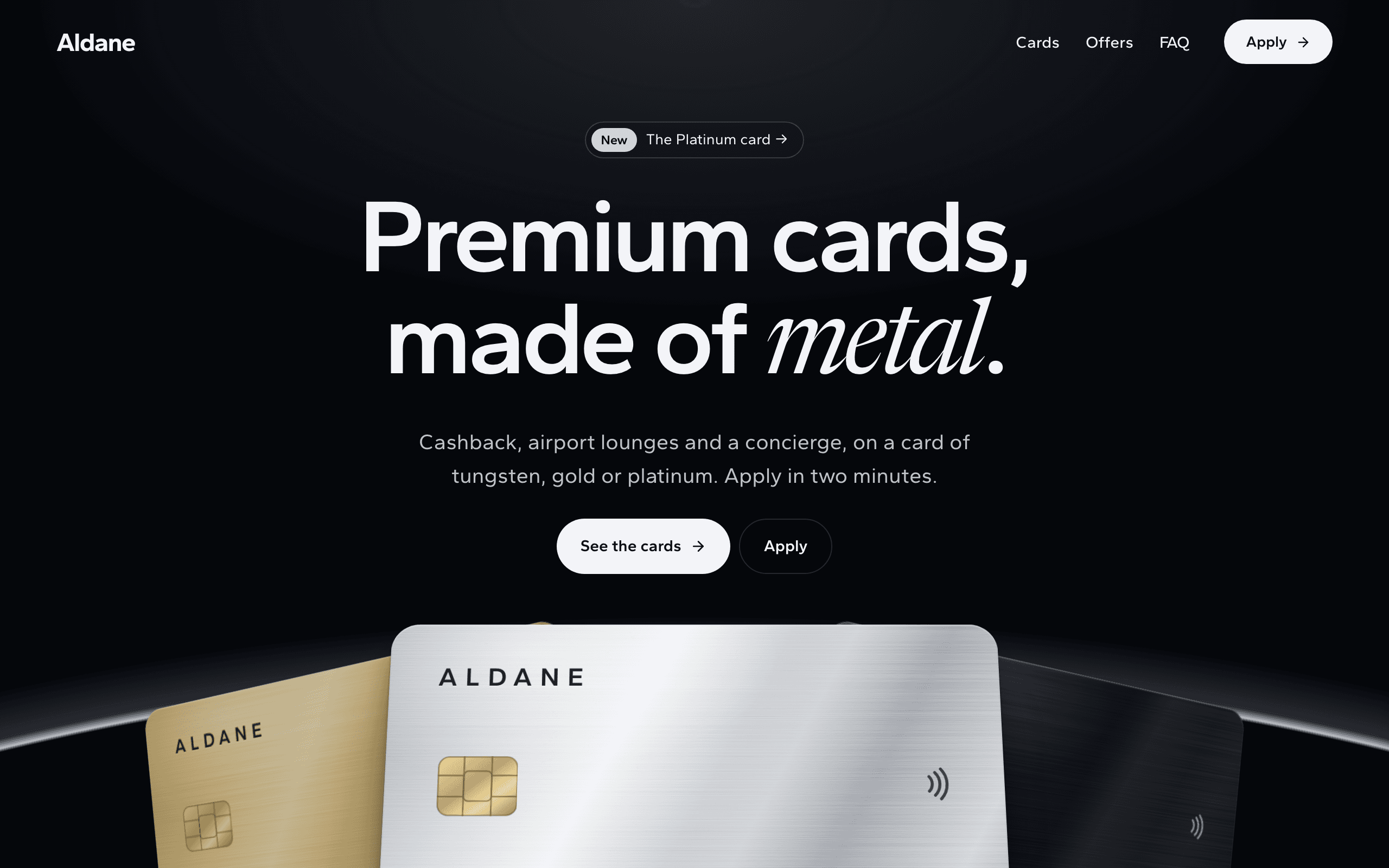
Hallmark is for a bank, fintech or card brand with a small range of premium cards and offers to compare. Each card is drawn in black, gold or platinum metal until you upload a picture of your real card, each card and offer has its own page of perks with its price or terms, and the Apply button on each card, and on each offer's page, fills its name into the application form.
Who Hallmark is for
- Bank launching a premium metal credit or debit card
- Fintech with a range of metal cards to compare and apply for
- Card brand with gold, black and platinum card tiers
- Private bank presenting its cardholder programme
- Premium card with airport lounge access and a concierge
- Issuer that adds new cards to its range over time
- Bank showing cards and financial offers such as deposits and credit lines
- Agency designing a metal card launch for a bank client
- Card programme taking applications through a form
What’s included
- Pages
- 5 pages, written and laid out
- Grows with you
- 3 card entries at /cards/, 4 offer entries at /offers/ — add one and its index and detail page both update
- Enquiries
- A working form — messages land in your Sitelas inbox
- Fonts
- Gantari · dark theme
Build Hallmark by asking your AI agent
- 1Connect Sitelas to Claude, ChatGPT or another AI agent that supports MCP. How to connect
- 2Ask for it in plain words: “Build a site for my card brand with the Hallmark template: we offer a black, a gold and a platinum metal card plus a savings deposit and a credit line, and people should be able to apply for any of them.”
- 3Open the preview link it sends back, ask for changes, and publish when it reads right.
Then keep changing it from the same chat
- Rewrite the copy“Rewrite the ‘Cards’ page with my details, in a warmer voice.”
- Change the design“Keep the layout, but swap Gantari for another typeface and use my brand colours.”
- Add card entries“Add three card entries from these notes, each with its own page.”
- Swap the photos“Replace the photos on the ‘Offers’ page with my own.”
Everything here can also be done by hand in the visual editor.
About the Hallmark template
Built for a bank or card brand with cards and offers to sell
Hallmark suits a bank, fintech or card brand with a few premium cards and offers, such as a savings deposit or a credit line.
What's on the page
- The opening: three drawn metal cards in black, gold and platinum, fanned out under a soft glow.
- Cards: each card shown large with its figure and price.
- Privileges: a statement that brightens as you read it, then lounges, a concierge, family cards and cashback, each shown rather than listed.
- Security: an app screen beside the protections a cardholder asks about.
- Offers: panels that stack as you scroll, each with a page of terms.
Adding cards and offers
Cards and offers are collections. Add one from the editor or ask your AI agent, and it appears on its list page with a page of its own. The home page shows the first three cards and four offers, by their order. A card is drawn in the metal you choose until you upload a picture of your real card.
Applying
The Apply button on each card, and on each offer's page, opens the application page with that product's name filled in. Applications arrive in your Sitelas inbox as form messages.
When to pick something else
Hallmark is the wrong template for these. Where there is a better one, it is linked.
- Financial adviser or wealth manager selling advice rather than a card — try Ballast
- Mortgage broker or loan officer — try Lintel
- Insurance agency quoting policies — try Awning
- Software sold on monthly plans with a free sign-up — try Orrery
- Budgeting or banking app pushing app-store downloads — try Gnomon
- AI or trip-planning app collecting a waitlist — try Gnomon
- Online banking with customer log-in, balances or instant card approval on the site
- Comparison site listing hundreds of cards from other banks with live rates
Free to use · No credit card required
Key Highlights
Questions about Hallmark
Can customers log in to online banking?
No. It is a marketing site, so there is no log-in, balance or card approval on it. Applications arrive in your Sitelas inbox as form messages, each with the card or offer the visitor chose, and you take it from there.
Can I add a new card later?
Yes. Cards and offers are collections: add one from the editor or ask your AI agent, and it appears on its list page with a page of its own. The home page shows the first three cards and four offers; the cards drawn in the opening, on the app screen and in the apply section, and the cashback figures, are edited separately.
Who is Hallmark for?
Hallmark is for a bank, fintech or card brand selling a few premium cards — metal cards with lounges, cashback and a concierge — and offers such as deposits or credit lines, that visitors compare before applying. For a financial adviser, pick Ballast; for a mortgage broker, Lintel; for a phone app with download buttons, Gnomon. There is no online banking, account or instant approval: applications arrive as messages, and the privacy page, the legal line, the security claims and each offer's terms are starting points for the wording your bank approves.
What pages come with Hallmark?
5 pages, already written and laid out: Home, Cards, Offers, Apply and Privacy. Add, rename or remove pages whenever you like.
Can Claude or ChatGPT build my site from Hallmark?
Yes. Connect Sitelas to your AI agent and ask for a site that uses Hallmark. It fills in your details, sends you a preview link, and publishes when you approve. The same chat can keep running the site afterwards.
Can I change Hallmark without code?
Yes. The Gantari type, all 5 pages and the card entries, every photo and every colour can be changed in the visual editor, or by asking your AI agent.
What does it cost?
Nothing to start, with no trial clock. A free site runs on a sitelas.com address; Pro is $9 a month per site ($90 a year) for your own domain, analytics and more room.
Make Hallmark yours
All 5 pages open in the editor already written, with 3 starter card entries. Make the words and photos yours, then publish.
Free to use · No credit card required
Related templates
All saas & product templates →
Splice
A warm one-page site for a team or HR app: features that pile up as you scroll, customer stories and a sign-up form.

Gnomon
A download page for a phone app: bold full-colour sections, app screens you edit, a spot for your video and an FAQ.

Keel
For open-source libraries, frameworks and CLIs: a copyable install line, docs, a showcase and a growing changelog.

Orrery
A bright one-page site for a CRM or follow-up tool: a product tour, customer quotes, three plans and a sign-up form.

Helio
For solar installers: a page per service and project, a how-solar-works explainer and a bill-based quote form.

Ironclad
For civil engineering firms and heavy trades: services, a real project record and a contact form.