

Awning Insurance agency website template
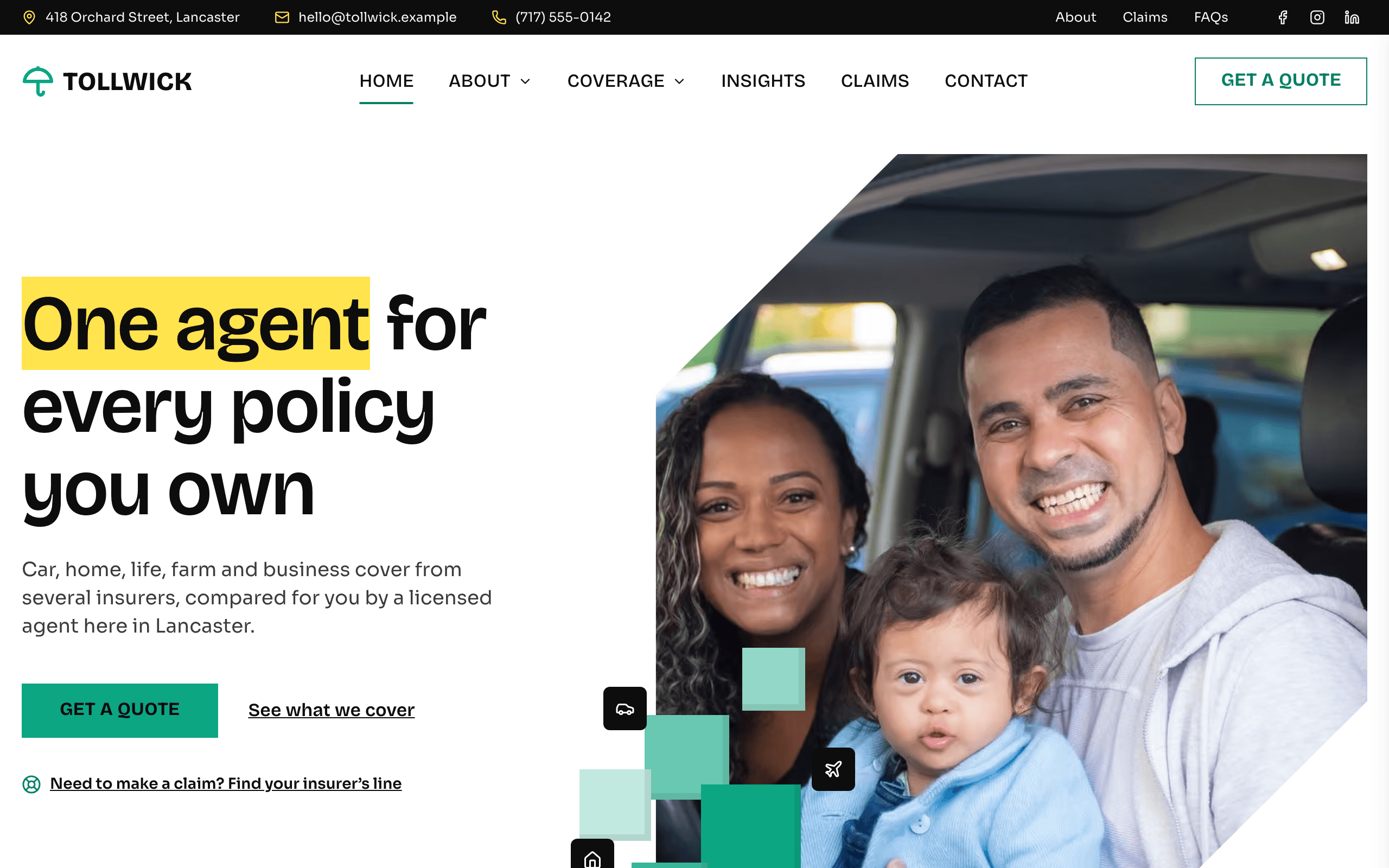
Awning is for an independent insurance agency that writes car, home, life, farm and business cover with several insurers, and the website design is built around that: every kind of cover has its own page, the quote form asks what to insure and never for a policy number, the claims page lists each insurer's claims line, and your license number sits in every footer.
Who Awning is for
- Independent insurance agency writing auto, home and life cover
- Local insurance agent who compares several insurers for each quote
- Family-run insurance office serving a small town and its farms
- Insurance broker for households and small businesses
- Agency selling farm and ranch, boat and RV policies
- Commercial lines agent covering shops, trades and small offices
- Insurance office that wants a claims help page with each insurer's claims line
- Independent agent who needs a license number in the footer
What’s included
- Pages
- 8 pages, written and laid out
- Grows with you
- 7 coverage entries at /coverage/, 4 article entries at /insights/ — add one and its index and detail page both update
- Enquiries
- A working form — messages land in your Sitelas inbox
- Fonts
- Bricolage Grotesque and Sora · light theme
Build Awning by asking your AI agent
- 1Connect Sitelas to Claude, ChatGPT or another AI agent that supports MCP. How to connect
- 2Ask for it in plain words: “Build a website for an independent insurance agency writing auto, home and life cover using the Awning template.”
- 3Open the preview link it sends back, ask for changes, and publish when it reads right.
Then keep changing it from the same chat
- Rewrite the copy“Rewrite the ‘About us’ page with my details, in a warmer voice.”
- Change the design“Keep the layout, but swap Bricolage Grotesque for another typeface and use my brand colours.”
- Add coverage entries“Add three coverage entries from these notes, each with its own page.”
- Swap the photos“Replace the photos on the ‘Our team’ page with my own.”
Everything here can also be done by hand in the visual editor.
About the Awning template
Built for independent agents
A local office that places car, home, life, farm and business policies with several insurers needs a site that explains what it covers, gets people to ask for a quote and helps them when they have a claim. Every page leads to the quote form.
What's on the site
- Home: what you cover, why use an independent agent, the insurers you represent, common questions, sample reviews, the quote form and your latest notes
- Coverage: a page for each kind of cover, with what it includes and what changes the price
- Claims: what to do in the first hour and each insurer's claims line
- About and Our team: how an independent agency works, how you are paid, and the people clients will talk to
- FAQ, Contact and Insights: questions by topic, office details with a map, and plain-English notes
What to know
Coverage pages and notes are collections, so you add one without touching the design. The forms take requests and questions only: there is no instant quote, policy portal or online payment. Insurer names, claims numbers and your license number are placeholders to replace.
When to pick something else
Awning is the wrong template for these. Where there is a better one, it is linked.
- Fee-only financial planner or wealth manager advising on investments — try Ballast
- Mortgage broker or loan officer taking pre-qualification enquiries — try Lintel
- Law firm handling injury or insurance disputes — try Proviso
- Insurance company selling policies online with instant quotes and checkout
- A site that needs a client login, policy documents portal or online payments
- Dealership listing pre-owned vehicles with prices and a payment calculator — try Camber
- Guarding and patrol company quoting security services — try Postern
Free to use · No credit card required
Key Highlights
Questions about Awning
Can clients get a quote or pay their premium online?
They can ask for a quote online, and you reply with prices. The quote form asks for a name, email, phone, what they want to insure, a ZIP code and when their current policy renews, and it lands in your Sitelas inbox. There is no instant rating, policy portal or premium payment; add a link to each insurer's own portal on the Claims page, or send it in your replies.
Where do I list the insurers I represent and their claims numbers?
In three places: a strip of insurer names on the home page, a grid of seven names on the About page, and a card per insurer on the Claims page with its cover and a tap-to-call claims line. They ship as placeholders such as "Regional mutual" and "(800) 555-0110", so put in the insurers you are appointed with and their real numbers before you publish.
Who is Awning for?
Awning is built for an independent insurance agency writing auto, home and life cover, a local insurance agent who compares several insurers for each quote and a family-run insurance office serving a small town and its farms. Not built for fee-only financial planner or wealth manager advising on investments — try Ballast instead.
What pages come with Awning?
8 pages, already written and laid out: Home, About us, Our team, Coverage, Claims, FAQ, Contact and Insights. Add, rename or remove pages whenever you like.
Can Claude or ChatGPT build my site from Awning?
Yes. Connect Sitelas to your AI agent and ask for a site that uses Awning. It fills in your details, sends you a preview link, and publishes when you approve. The same chat can keep running the site afterwards.
Can I change Awning without code?
Yes. The Bricolage Grotesque and Sora type, all 8 pages and the coverage entries, every photo and every colour can be changed in the visual editor, or by asking your AI agent.
What does it cost?
Nothing to start, with no trial clock. A free site runs on a sitelas.com address; Pro is $9 a month per site ($90 a year) for your own domain, analytics and more room.
Guides that use Awning
Insurance Agency SEO: Getting Found by People Shopping Their Renewal
Insurance agency SEO in plain steps: the lines and towns to target, a Google Business Profile, a page per line of cover, a quote form that asks when the policy renews, reviews and local links.
Insurance Agency Website Design: What Clients Check Before They Call
What insurance agency website design needs: a page per kind of cover, a safe quote form, a claims page, your license and your agents. Then a real build from one message to Claude.
Make Awning yours
All 8 pages open in the editor already written, with 7 starter coverage entries. Make the words and photos yours, then publish.
Free to use · No credit card required
Related templates
All agencies & firms templates →
Lanyard
For recruitment and staffing agencies: a job board with CV applications, services and case studies.

Lintel
For an independent mortgage broker or loan officer: an inquiry form, loan types, partners and a disclosures page.

Lodestone
For advisory firms selling defined engagements, with services, published prices, articles and a contact form.

Obsidian
An editorial site for boutique creative agencies and brand studios, with projects, a blog and pricing.

Proviso
For a small firm of several attorneys: a page per practice area, a profile per lawyer, articles and a consultation form.

Shortlist
For staffing companies and temp agencies: a jobs board by job type, CV applications and a page per service.