

Camber Car dealership website template
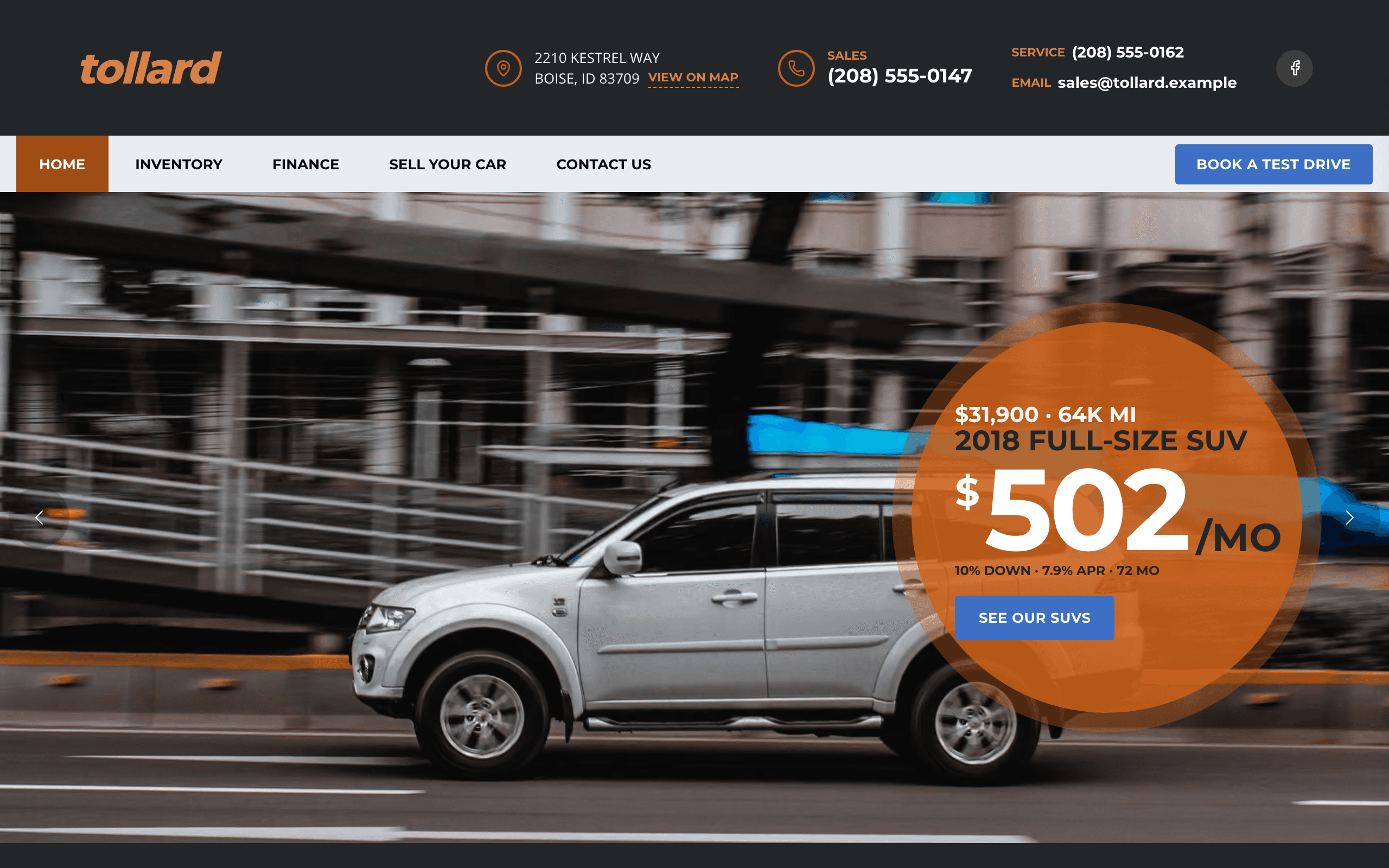
Camber is for an independent used-car dealer who sells from one lot. Every car has its own page with photos, the price, a spec table, fuel economy and a question form, and the home page shows your cars, the ones under $20,000, SUVs and trucks, and your specials. Finance has a monthly payment calculator and a pre-approval form, and the Sell your car page asks for photos of a trade-in and promises a written offer.
Who Camber is for
- Independent used car dealer selling cars off a lot
- Small car dealership listing its stock with photos and prices
- Pre-owned car lot with a few dozen vehicles at a time
- Family-run auto sales yard selling SUVs, trucks and sedans
- Classic or specialty car dealer listing each vehicle
- Buy-here pay-here lot that wants a payment calculator and pre-approval form
- Dealer that takes trade-ins and buys cars from the public
- Truck and SUV dealer showing specials on the home page
What’s included
- Pages
- 5 pages, written and laid out
- Grows with you
- 9 vehicle entries at /inventory/ — add one and its index and detail page both update
- Enquiries
- A working form — messages land in your Sitelas inbox
- Fonts
- Montserrat and Open Sans · light theme
Build Camber by asking your AI agent
- 1Connect Sitelas to Claude, ChatGPT or another AI agent that supports MCP. How to connect
- 2Ask for it in plain words: “Build a website for an independent used car dealer selling cars off a lot using the Camber template.”
- 3Open the preview link it sends back, ask for changes, and publish when it reads right.
Then keep changing it from the same chat
- Rewrite the copy“Rewrite the ‘Inventory’ page with my details, in a warmer voice.”
- Change the design“Keep the layout, but swap Montserrat for another typeface and use my brand colours.”
- Add vehicle entries“Add three vehicle entries from these notes, each with its own page.”
- Swap the photos“Replace the photos on the ‘Finance’ page with my own.”
Everything here can also be done by hand in the visual editor.
About the Camber template
Built for independent car lots
A used-car lot with a few dozen cars needs a site that shows what is for sale today, what each car costs and how to come and drive it. Every car page ends in a question form, and the header carries the phone number and a test-drive button.
What's on the site
- Home: an offer slider, your cars in three tabs, tiles for finding and selling a car, your specials, why customers choose you, and a note about the lot
- Inventory: every car, split into SUVs and trucks and sedans and hatchbacks, each linking to its own page
- Each car's page: photos, price, the spec table, city and highway mpg, the overview, features and a question form
- Finance: a monthly payment calculator and a pre-approval form
- Sell your car: a trade-in form with photo upload
- Contact: a message form, sales and service hours, and a map
What to know
Cars are a collection, so you add, edit or remove one without touching the design. The inventory is typed in: there is no feed from dealer management software, so it suits a lot that lists cars by hand. Forms send enquiries only — there is no online purchase, credit application or payment.
When to pick something else
Camber is the wrong template for these. Where there is a better one, it is linked.
- Garage that fixes and services cars rather than selling them — try Mainstay
- Insurance agency quoting auto cover — try Awning
- Franchise dealer that needs a live feed from dealer management software
- Car rental or car sharing with online booking and payment
- Online car marketplace where the public posts their own listings
- Repair company with a staffed crew and a page per trade — try Spanner
Free to use · No credit card required
Key Highlights
Questions about Camber
How do I add and remove cars?
Each car is an entry in a collection, so you add one by filling in its fields: name, price, photos, year, mileage, fuel, transmission, drive, engine, colors, mpg, stock number, VIN, an overview and a features list. It gets its own page; set its Inventory group and Price band so it lands in the right Inventory list and home page tab, and type Special to put it in the Specials band. Delete the entry when the car sells. The stock is typed in: there is no feed from dealer management software, so it suits a lot that lists cars by hand.
Can customers apply for finance or pay for a car online?
They can estimate a monthly payment with the calculator on the Finance page and send a pre-approval form with their budget, credit and trade-in, and you call them back. There is no credit application, online purchase or deposit payment on the site.
Who is Camber for?
Camber is built for an independent used car dealer selling cars off a lot, a small car dealership listing its stock with photos and prices and a pre-owned car lot with a few dozen vehicles at a time. Not built for garage that fixes and services cars rather than selling them — try Mainstay instead.
What pages come with Camber?
5 pages, already written and laid out: Home, Inventory, Finance, Sell your car and Contact us. Add, rename or remove pages whenever you like.
Can Claude or ChatGPT build my site from Camber?
Yes. Connect Sitelas to your AI agent and ask for a site that uses Camber. It fills in your details, sends you a preview link, and publishes when you approve. The same chat can keep running the site afterwards.
Can I change Camber without code?
Yes. The Montserrat and Open Sans type, all 5 pages and the vehicle entries, every photo and every colour can be changed in the visual editor, or by asking your AI agent.
What does it cost?
Nothing to start, with no trial clock. A free site runs on a sitelas.com address; Pro is $9 a month per site ($90 a year) for your own domain, analytics and more room.
Make Camber yours
All 5 pages open in the editor already written, with 9 starter vehicle entries. Make the words and photos yours, then publish.
Free to use · No credit card required
Related templates
All fitness, pet care & local services templates →
Kilo
For strength gyms and CrossFit-style boxes: programs, coaches, three monthly plans and a free first session.

Lather
For dog grooming salons: services with prices by size, a booking request form, the groomers and a grooming journal.

Postern
For guarding and patrol firms: a page per service, your officers, a 24/7 number on every page and a quote form.

Heel
For dog trainers and puppy schools: program pages with prices, trainer profiles, class times and an enquiry form.

Cami
A minimalist, image-led portfolio: large project photos, a case-study page per project and an enquiry form.

Chafer
For event caterers: service pages with quote forms, sample menus priced per guest, venues, a gallery and a journal.