

The connector
Sitelas is a remote MCP server, so an AI agent can build and run your sites in natural conversation. In Claude or ChatGPT it is one click; every other client takes a few lines of config:
- Open Sitelas in Claude’s connector directory and choose Add — or open the Sitelas app in ChatGPT.
- Sign in to Sitelas (Google) and approve. Claude and ChatGPT both register themselves automatically — there’s no client ID to enter.
Everything else reads a config file rather than a directory. Point it at https://sitelas.com/api/mcp and sign in the same way — the exact shape differs by client:
claude mcp add --transport http sitelas https://sitelas.com/api/mcp{
"mcpServers": {
"sitelas": { "url": "https://sitelas.com/api/mcp" }
}
}{
"servers": {
"sitelas": { "type": "http", "url": "https://sitelas.com/api/mcp" }
}
}{
"mcpServers": {
"sitelas": { "serverUrl": "https://sitelas.com/api/mcp" }
}
}{
"mcpServers": {
"sitelas": { "httpUrl": "https://sitelas.com/api/mcp" }
}
}Using a different MCP client? Sitelas is listed on Smithery, which generates the right config for a much longer list of clients.
Two ways to authenticate, same account, same tools:
Interactive connector
- Who
- You, in Claude / a browser
- How
- OAuth 2.1 — sign in once, approve. Claude registers itself (DCR).
- When
- Everyday use with a human present.
API key (headless)
- Who
- An agent, script, or automation
- How
- A bearer key (stl_pat_…) you generate in Account → API keys.
- When
- Unattended / programmatic — no browser.
What your agent can do
The connector exposes tools across the full lifecycle: discover templates; create, edit, and publish sites (surgical patches, brand & palette changes, image search, URL cloning); manage content collections; read submissions, contacts, and analytics; schedule jobs; and configure custom domains. Destructive actions (like deleting a site) are annotated and require explicit confirmation.
Example prompts
Tool reference
The connector’s tools are the same in Claude, in ChatGPT and for an agent with an API key, and every earlier tool name keeps working everywhere. Here they are by category:
| Category | What it does | Key tools |
|---|---|---|
| Discover | Find the template that fits a brief, or browse them; look up primitives and section archetypes. | find_templates · get_primitive_schema · get_example_fixtures |
| Read | List sites and inspect one — pages, theme, publish state, its design memory, and what changed. | list_sites · get_site · get_page · get_site_changes |
| Create & edit | Create a site from a template, switch it to another, then customize — surgical patches, colours and fonts, image search, URL cloning. | create_site_from_template · replace_site · patch_nodes · set_theme · replace_images_from_search · capture_url |
| Your own photos | Put your own photo on one spot of your site. Your agent gives you a one-time link: open it, choose the photo, and it goes into your draft. No sign-in. The link works once, for 30 minutes. A photo already online goes up, onto its spot, in one call. | get_editor_link · upload_image |
| Data for widgets | Give a calculator, lookup or finder on your site the list it needs — from a link to a published sheet or file, or a one-time upload link for a file on your computer. | upload_data_file |
| Pages & structure | Add, copy, delete and reorder pages; edit per-page and per-item SEO. | add_page · update_page · delete_page · update_seo |
| Content collections | Create collections (blog, projects, listings) and manage their items. | create_collection · add_content_item · edit_content_item · delete_content_item · delete_collection |
| Languages | Add a language, read a page, item, header or footer's words, and save a translation. Each language lives at its own address, such as /fr, and goes live on publish. | translate |
| Publish & undo | Publish the whole site, one page or one item; take it offline; undo the last publish or discard the draft. | publish · unpublish · undo · screenshot_page |
| Inbox & CRM | Read submissions; view contacts and everything one person has done. | list_submissions · read_submission · list_contacts |
| Analytics | Read pageviews, top pages and referrers, with the week's submissions and new contacts. | get_analytics |
| Domains & SEO | Connect, check and remove a custom domain; set site-wide search settings, language, business details (address, type, profiles) and Search Console verification tags; connect your Google Analytics, Tag Manager, Meta Pixel or Plausible. Every site serves its own sitemap. | set_custom_domain · check_custom_domain · remove_custom_domain · update_seo · set_tracking_codes |
| Design review | Self-review a site against design and health checks before shipping, and check the live site after publishing. | review_site · read_rendered_page |
Destructive tools (like delete_site or delete_page) are annotated destructive and require an explicit confirmation before they run.
API keys (headless access)
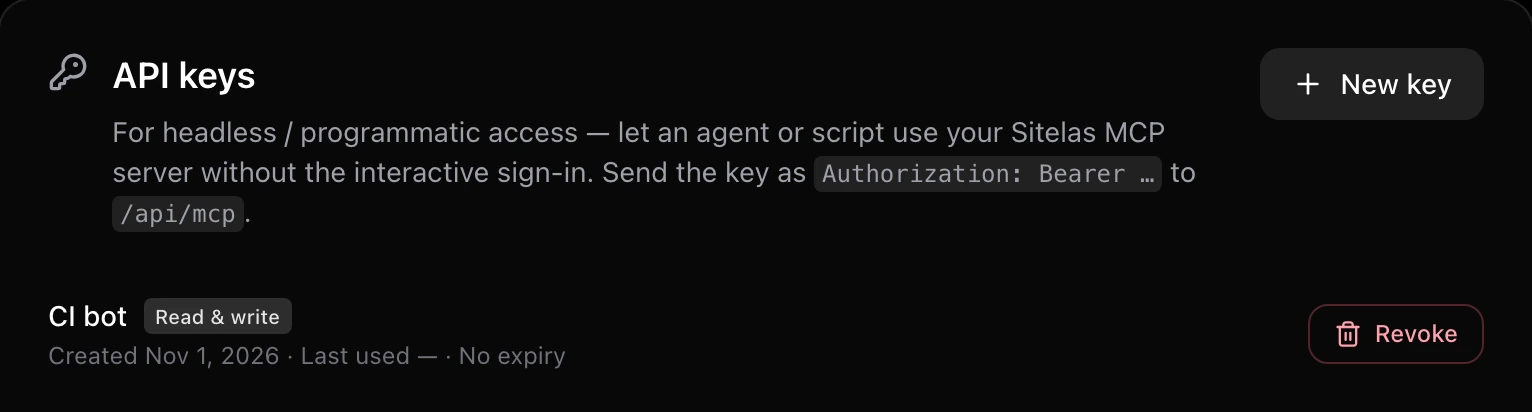
The connect flow above uses interactive OAuth — a human signs in. For an agent, script, or automation that runs without a browser, create an API key in Dashboard → Account → API keys (shown once) and send it as a bearer header to /api/mcp. No OAuth round-trip.
Claude Code
claude mcp add --transport http sitelas https://sitelas.com/api/mcp \
  --header "Authorization: Bearer $SITELAS_API_KEY"
Anthropic API (build your own agent)
client.beta.messages.create(
    model="claude-opus-5",
    max_tokens=16000,
    betas=["mcp-client-2025-11-20"],
    mcp_servers=[{
        "type": "url",
        "url": "https://sitelas.com/api/mcp",
        "name": "sitelas",
        "authorization_token": os.environ["SITELAS_API_KEY"],
    }],
    tools=[{"type": "mcp_toolset", "mcp_server_name": "sitelas"}],
    messages=[{"role": "user",
               "content": "Build a portfolio site and publish it."}],
)
Any MCP client / raw HTTP
curl -X POST https://sitelas.com/api/mcp \
  -H "Authorization: Bearer stl_pat_…" \
  -H "Content-Type: application/json" \
  -H "Accept: application/json, text/event-stream" \
  -d '{"jsonrpc":"2.0","id":1,"method":"tools/list","params":{}}'
The key acts on your account with the same ownership scoping as the connector — the same tool catalog, no human in the loop. Set an optional expiry, watch its last-used date, and revoke it any time from the same screen.
Keep reading
Start here
What Sitelas is, how to begin, and how a site gets from idea to live.
The editor
Change your site by hand: text, photos, theme, pages and posts, item layouts and fields, other languages, how each page shows up in Google, saving and publishing.
Your dashboard
Sites, form submissions, search & SEO, your business in Google, verifying your site with Google, custom domains, AI credits, plans and limits, your account and sign-in.
Trust & support
How your data is handled, how the platform is secured, common questions, and how to reach us.