

Bollard Logistics company website template
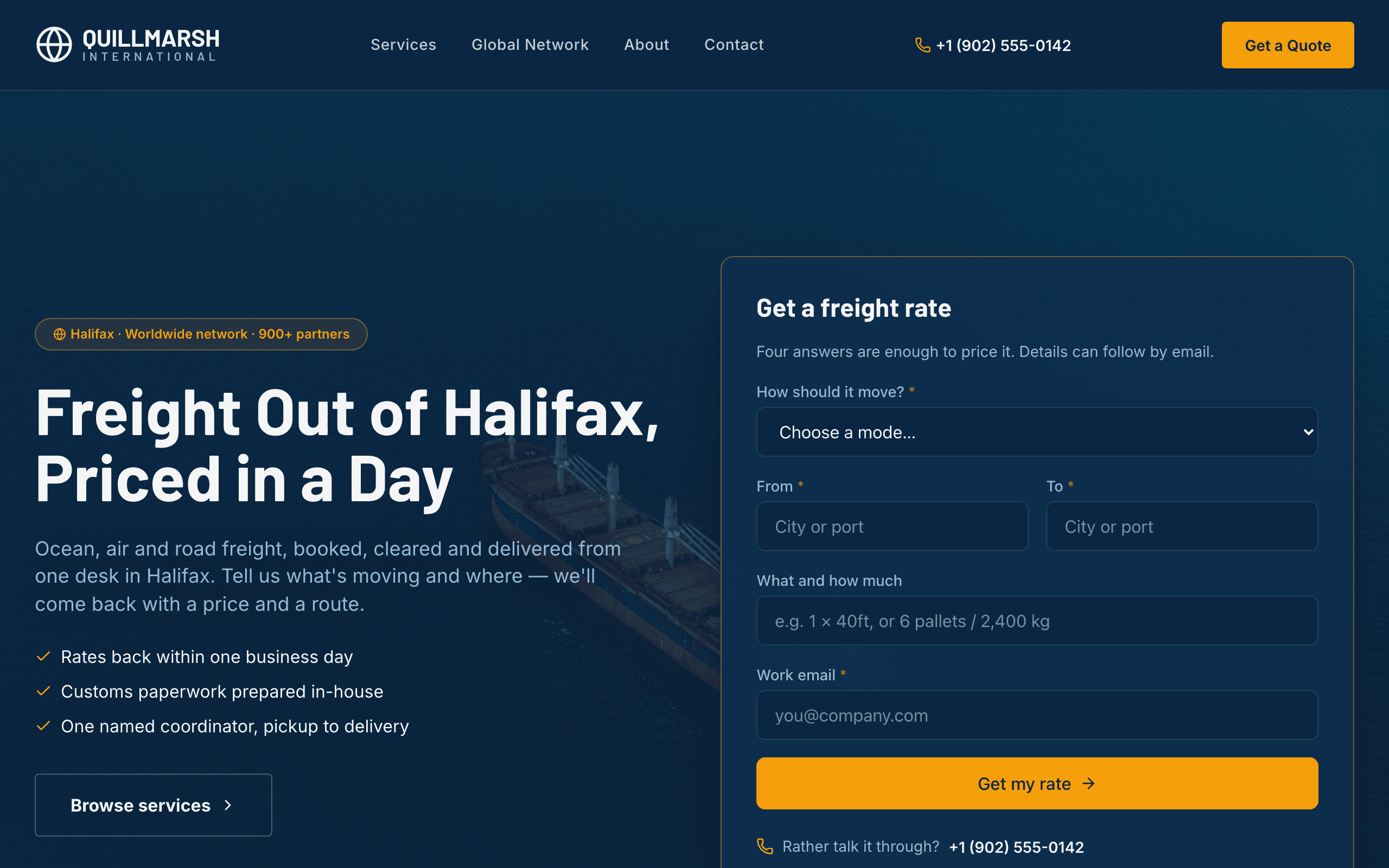
Built for freight forwarders, customs brokers and logistics providers. A short rate request form sits in the hero with the desk's phone number, and the page answers what shippers ask first: where you ship, how long it takes, how often it leaves and what happens at customs.
Who Bollard is for
- Freight forwarder offering ocean, air and road freight
- Customs broker that also arranges transport
- Third-party logistics (3PL) provider with warehousing and distribution
- Trucking or intermodal carrier selling lanes and transit times
- Cold-chain or pharmaceutical logistics specialist
- Dangerous-goods or project-cargo forwarder
- Port-based logistics company whose pitch is its partner network
- Courier or time-critical freight service for business customers
What’s included
- Pages
- 7 pages, written and laid out
- Grows with you
- 9 service entries at /services/ — add one and its index and detail page both update
- Enquiries
- A working form — messages land in your Sitelas inbox
- Fonts
- Barlow and Inter · dark theme
Build Bollard by asking your AI agent
- 1Connect Sitelas to Claude, ChatGPT or another AI agent that supports MCP. How to connect
- 2Ask for it in plain words: “Build my freight forwarding website with the Bollard template: we're a 20-person forwarder in Savannah moving ocean and air freight between the US and Northern Europe, with customs clearance, our main lanes and transit times, and a rate request form.”
- 3Open the preview link it sends back, ask for changes, and publish when it reads right.
Then keep changing it from the same chat
- Rewrite the copy“Rewrite the ‘Services’ page with my details, in a warmer voice.”
- Change the design“Keep the layout, but swap Barlow for another typeface and use my brand colours.”
- Add service entries“Add three service entries from these notes, each with its own page.”
- Swap the photos“Replace the photos on the ‘Global Network’ page with my own.”
Everything here can also be done by hand in the visual editor.
About the Bollard template
Built for freight forwarders and logistics firms
Shippers want to know whether you cover their lane and how fast you can price it. Bollard puts a short rate form and your phone number at the top, with a table of lanes and transit times right after.
What's on the site
- Home with the rate form, a lane board of transit times and departure frequency, and a four-step shipment timeline
- Services, each with its own page, what is included and a call to action
- Global Network, with your routes drawn on a map from a list of hubs
- About, Contact, and privacy and terms pages
What to know
Rate requests and enquiries land in your Sitelas inbox, where your AI agent can read them and draft replies. The FAQ already covers customs, insurance and full versus shared container loads, so edit it to match how you work.
When to pick something else
Bollard is the wrong template for these. Where there is a better one, it is linked.
Free to use · No credit card required
Key Highlights
Questions about Bollard
Can shippers request a rate from the home page?
Yes. A four-question rate form sits in the hero, and every request lands in your Sitelas inbox.
Can I show my routes and transit times?
Yes. A lane board lists transit times and departure frequency, and a network map draws your routes from an editable list of hubs.
Who is Bollard for?
Bollard is for a freight forwarder, customs broker or third-party logistics firm that wins work by quoting fast. A short rate form sits in the hero asking how the cargo should move, from where, to where and a work email, with the freight desk's phone number in the header. Below it a route map and a lane board show transit times and how often each lane departs, then your services, a four-step shipment timeline and an FAQ on customs, insurance and full versus shared containers. Each service has its own page, a Global Network page shows the forwarder networks you belong to and your lanes by region, and the Contact page carries the full quote form with origin, destination, load size and ready date. The site does not track shipments itself: link to your own tracking system.
What pages come with Bollard?
7 pages, already written and laid out: Home, Services, Global Network, About, Contact, Privacy Policy and Terms of Use. Add, rename or remove pages whenever you like.
Can Claude or ChatGPT build my site from Bollard?
Yes. Connect Sitelas to your AI agent and ask for a site that uses Bollard. It fills in your details, sends you a preview link, and publishes when you approve. The same chat can keep running the site afterwards.
Can I change Bollard without code?
Yes. The Barlow and Inter type, all 7 pages and the service entries, every photo and every colour can be changed in the visual editor, or by asking your AI agent.
What does it cost?
Nothing to start, with no trial clock. A free site runs on a sitelas.com address; Pro is $9 a month per site ($90 a year) for your own domain, analytics and more room.
Make Bollard yours
All 7 pages open in the editor already written, with 9 starter service entries. Make the words and photos yours, then publish.
Free to use · No credit card required
Related templates
All agencies & firms templates →
Shortlist
For staffing companies and temp agencies: a jobs board by job type, CV applications and a page per service.

Spire
For brand and web design studios: a full-width project mosaic, a team photo grid, a journal and an enquiry form.

Tessel
A bright, friendly site for small web and marketing agencies: services, projects, team and contact.

Awning
For an independent insurance agency: a page per kind of cover, a quote form, a claims page and your license number.

Ballast
For a fee-only financial advisor or small practice: services, advisors, fees, client stories and a consultation form.

Cornice
A site for brand, web and film studios: a project mosaic, a showreel, client quotes and studio news.