

Build and Run a Website From Cursor, VS Code, or Gemini CLI
Sitelas is a connector, not an app — so the agent already in your editor can build your site and then keep running it. Here is the config for Cursor, VS Code, Gemini CLI and Claude Code, the first sentence to say, and the real site an agent built through it.

Usman Haider

Most people meet Sitelas inside Claude. That is the busiest door, not the only one.
You already have an agent in your editor. Cursor, VS Code, Antigravity and Gemini CLI can all call outside tools.
Until last week, Sitelas turned some of them away at the door. It checked where a request came from, and only recognised Claude. That check now knows about desktop editors too.
So this post is the config for each client, and the sentence to say once it is connected.
At the end there is a real site an agent built through it while I was writing this.
What "connected" actually gets you
MCP is just a way for an agent to call tools that live somewhere else. Sitelas publishes 84 of them.
The plain version: your agent can make a website, and then keep looking after it.
Building is the part everyone expects. It picks a design, writes the copy, finds images, puts pages together.
Running it is the half that is harder to copy:
- read the messages your contact form collected
- draft replies to those messages
- add a blog post, change a price, swap a photo
- check which pages people actually visit
That second list is why an agent needs a website builder built for it, rather than a canvas built for a person. There is more on that idea on the website builder for AI agents page.
Nothing goes public by accident
Read this bit before you connect.
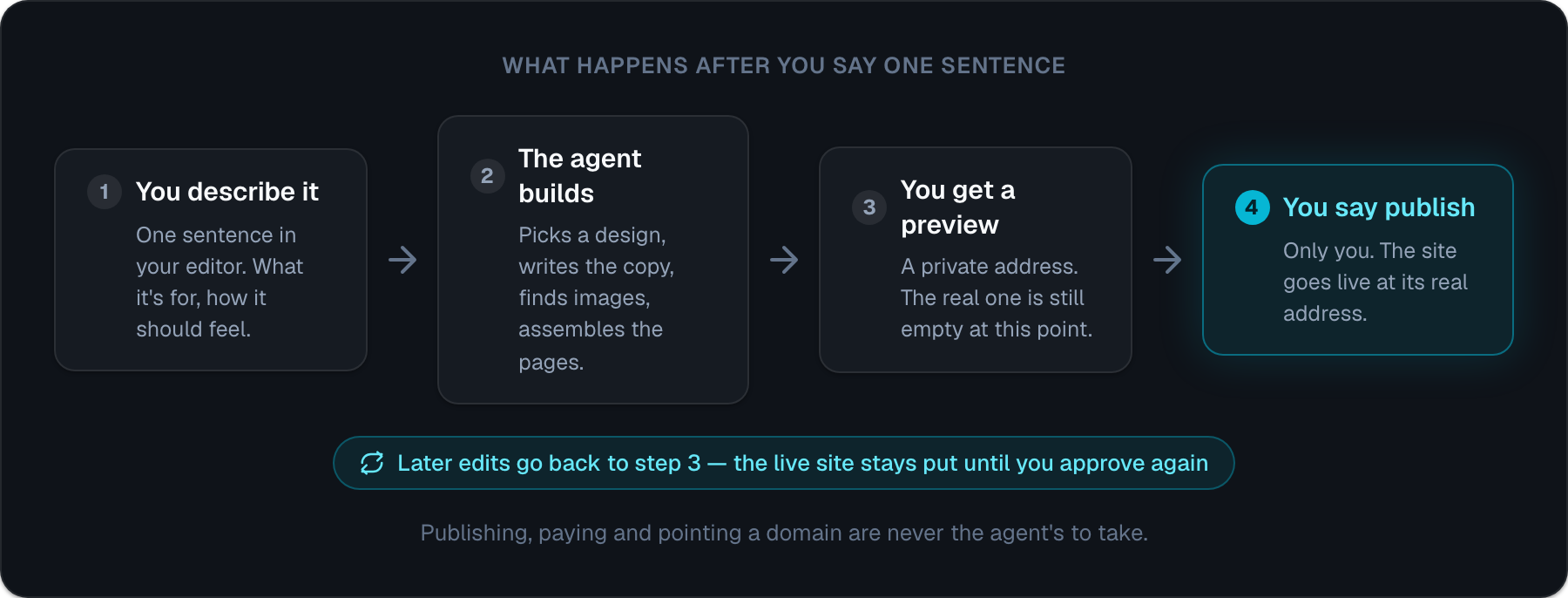
Every build lands on a private preview address first. The real address stays empty until you say publish. Edits work the same way — they collect on the preview, and the live site does not move until you approve.
Three things are never the agent's to take:
- Publishing. It asks. You answer.
- Paying. It can hand you a checkout link. The card details happen on the payment page, not in your terminal.
- Your domain. Pointing a real domain at a site is yours.
Capability is the easy half. This is the half that makes handing over the keys reasonable.
Connect it
Pick your client below. The formats really are different, so copying one block into another client is the main way this goes wrong. A wrong key looks correct and quietly fails to connect.
Claude Code — run this in your terminal:
claude mcp add --transport http sitelas https://sitelas.com/api/mcp
Cursor — ~/.cursor/mcp.json, or .cursor/mcp.json for a single project:
{
  "mcpServers": {
    "sitelas": { "url": "https://sitelas.com/api/mcp" }
  }
}
VS Code — .vscode/mcp.json. Note the root key is servers, not mcpServers, and type is required:
{
  "servers": {
    "sitelas": { "type": "http", "url": "https://sitelas.com/api/mcp" }
  }
}
Antigravity (CLI, IDE and 2.0) — ~/.gemini/config/mcp_config.json, or .agents/mcp_config.json for a single project. Note serverUrl:
{
  "mcpServers": {
    "sitelas": { "serverUrl": "https://sitelas.com/api/mcp" }
  }
}
This is the one to use if you are on Google's newer terminal. Google ended Gemini CLI for free, AI Pro and AI Ultra accounts in June, and Antigravity took over. The two do not share a key name — Antigravity rejects url and httpUrl outright, which is the single easiest way to get a config that looks right and never connects.
Gemini CLI — ~/.gemini/settings.json. Still the right block if your account still has it. Note httpUrl, not url:
{
  "mcpServers": {
    "sitelas": { "httpUrl": "https://sitelas.com/api/mcp" }
  }
}
Claude on web, desktop or mobile needs no config at all. It is one click from the directory listing, which the one-click setup post walks through.
These same blocks are kept current on the docs page, which is the version to trust if this post ever goes stale.
The first time your agent calls a Sitelas tool, a browser opens and asks you to sign in. Signing in creates the account if you do not have one, so there is no separate registration step.
Say this first
This is where most people stall. The connection works and then nothing happens, because an empty prompt box does not suggest anything.
Describe the thing the way you would describe it to a person. What it is for, roughly how it should feel, and what a visitor should do.
Here is the exact sentence I used:
Build a one-page site for Quiver, an open-source command-line tool that snapshots your dev environment so you can restore a machine instead of rebuilding it by hand. Engineer-built feeling, dark, no marketing fluff. Add an email signup for the beta.
You do not have to get it right first time. Everything after this is a conversation: make the headline shorter, that green is too bright, add a section about what it works with.
What came back
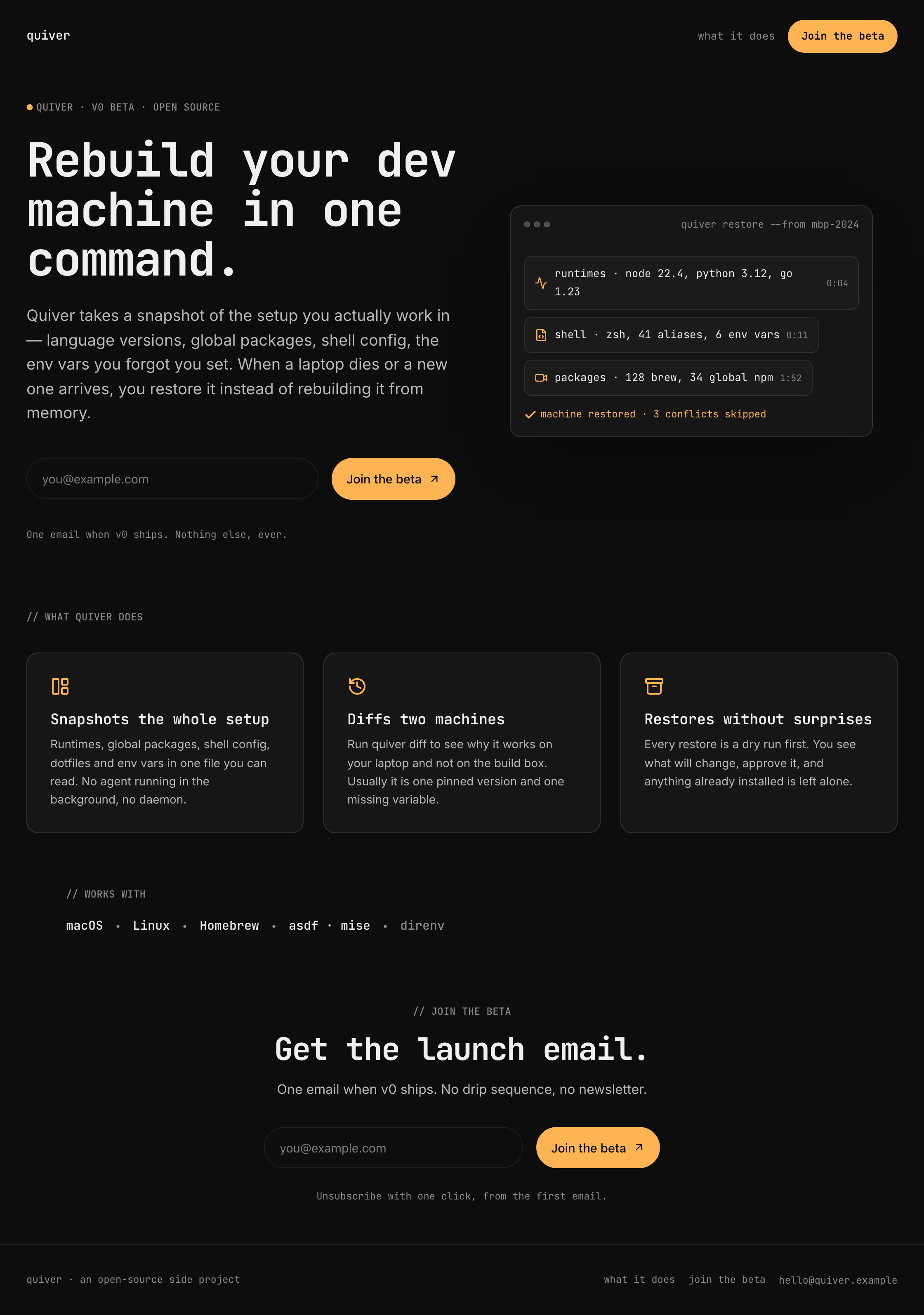
A few things in there are worth pointing at.
The card beside the headline is a restore actually running. Runtimes, then shell config, then packages. Then a line saying the machine was restored and three conflicts were skipped.
Nobody asked for that specifically. It came from "engineer-built feeling, no marketing fluff".
The strip near the bottom says what Quiver works with. In the design it started life as a row of investor names. Quiver has no investors, so it became a list of tools instead.
That matters more than it sounds. A page that invents a funding round or a signup count is worse than a plain one. It is also very easy for an agent to produce if nobody stops it.
This site is on a preview address and is not published. preview-quiver-6950.sitelas.com shows the page. quiver-6950.sitelas.com shows nothing, because I never said publish. That gap is the whole safety model, and you can check it yourself right now.
Then keep going
The build is the small half. Once a site exists, the same connection is how you run it — from the same editor, in the same conversation.
Ask it what came in this week and it reads your form messages. Ask it to reply and it drafts them. Ask what people are actually reading and it checks the analytics.
That loop is the argument for the whole thing, and it is written up properly in Can an AI Agent Build and Run a Website?.
Start
Add the block for your client, restart it, and say one sentence about the site you want.
If you are in Claude rather than an editor, add Sitelas from the connector directory instead — same tools, one click, no file to edit.

Usman Haider
Founder of Sitelas — the website builder for AI agents.


