

I Launched a Waitlist and Ran It From One Claude Chat
One conversation: Claude builds the launch page, collects every signup in your Sitelas inbox, scores them by fit, and drafts the early-access invites from your Gmail — no site builder, form tool, or spreadsheet triage.

Usman Haider

A waitlist is the cheapest demand test you can run before you build the thing. The problem is the plumbing: a landing-page tool, a form tool, a spreadsheet to watch the signups, and then — when you finally have a list — a mail-merge to invite the right people. Four tools and a long evening, for what should be a two-day experiment.
I ran the whole thing for a fictional indie SaaS, Juno (an analytics co-pilot), from a single Claude chat. Page to published list to drafted invites. Here's exactly how — and why it's a category no static-site builder can touch.
What an MCP connector actually is (30-second version)
Claude can connect to outside tools through MCP connectors. Add one, and Claude can do things in that tool for you, not just talk about it. You already use the Gmail, Calendar, and Google Drive connectors. Sitelas has one too — add it and Claude can design sites, publish them, and read your form submissions, all from chat. That's the difference between "Claude gives me launch advice" and "Claude runs the launch." (Want the plain step-by-step first? See How to Build a Website From a Claude Chat.)
Step 1: Connect Sitelas to Claude
One-time setup: Sitelas is in Claude's connector directory, so adding it takes one click — open the listing and choose Add.
Using Claude Code or Claude Desktop instead? Those read a config file rather than the directory, so point them at https://sitelas.com/api/mcp.
Sign in to Sitelas when prompted, and switch on the Gmail and Google Sheets connectors while you're there (we'll use them for the sheet and the invites). Setup's done; everything else is just asking.
Step 2: Ask Claude to build and publish the launch page
You describe it once — Claude picks a layout, writes the form, previews it, and publishes:
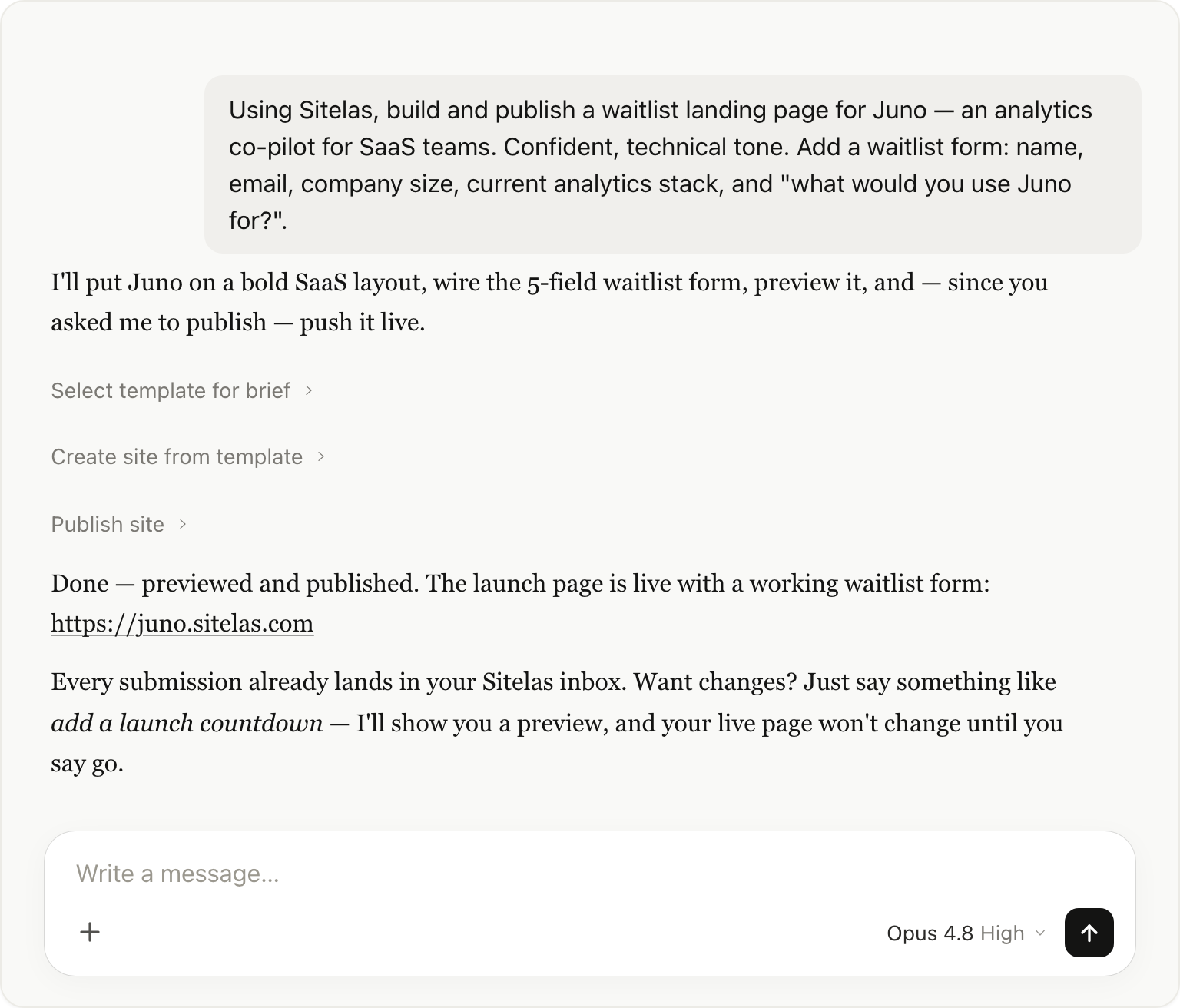
That's the real, branded launch page at the top of this post — live on the web, with a working waitlist form. Because you told it to publish, Claude previews the page and pushes it live in one go; for any change after launch it shows you a preview first, so your live page never changes until you say go. Every submission already lands in your Sitelas inbox. Want changes? "Add a launch countdown." "Make the hero darker." You say it; Claude edits, previews, and republishes. No drag-and-drop, no template wrestling.
Step 3: Ask Claude to drop the signups into Google Sheets
Every signup already lands in your Sitelas inbox — no setup, nothing to connect on Sitelas's side. Want them in a spreadsheet you can slice? Just ask Claude:
"Put my Juno waitlist signups in a Google Sheet and keep it updated."
Claude reads the signups from your site with the Sitelas connector, then writes them to a sheet in your own Drive using its own Google Sheets connector — the same one you'd use for any other Sheets task. Sitelas never sits in the middle, and your visitors never see a login screen. New signups? Ask Claude to refresh the sheet.
Step 4: Let the signups roll in — then ask Claude to score them by fit
Post the link on X, in your communities, on launch day. As signups arrive, Claude reads them straight from your site's submissions — no exporting, no sorting a spreadsheet by hand. You ask:
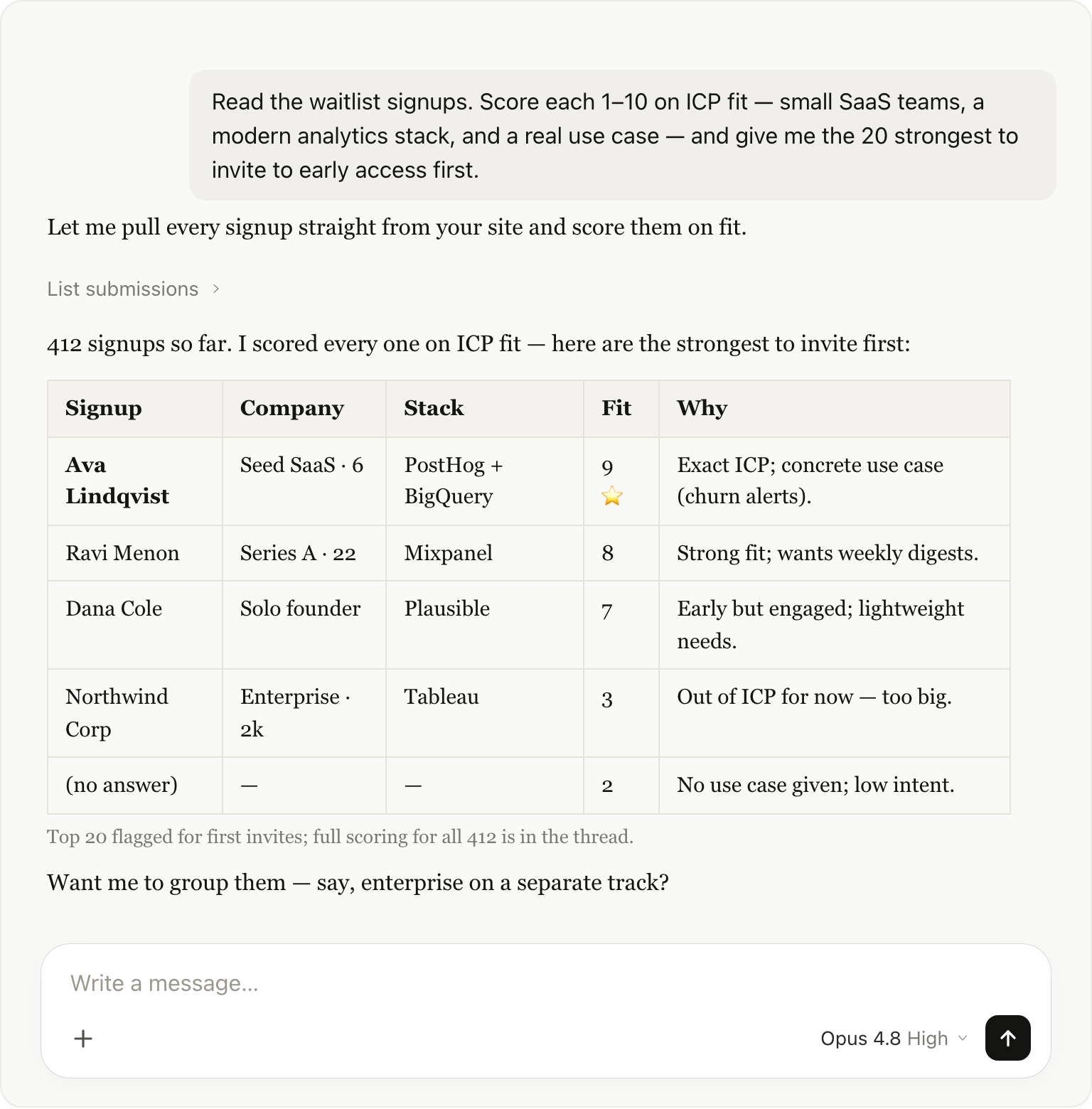
A 400-row spreadsheet becomes a ranked, reasoned shortlist — the people most likely to convert and give you real feedback, first. Then you push on it like a growth partner: "Who mentioned churn?" "Group the enterprise ones for a separate track."
Step 5: Ask Claude to draft the invites
Gmail is already connected, so you close the loop in the same chat:
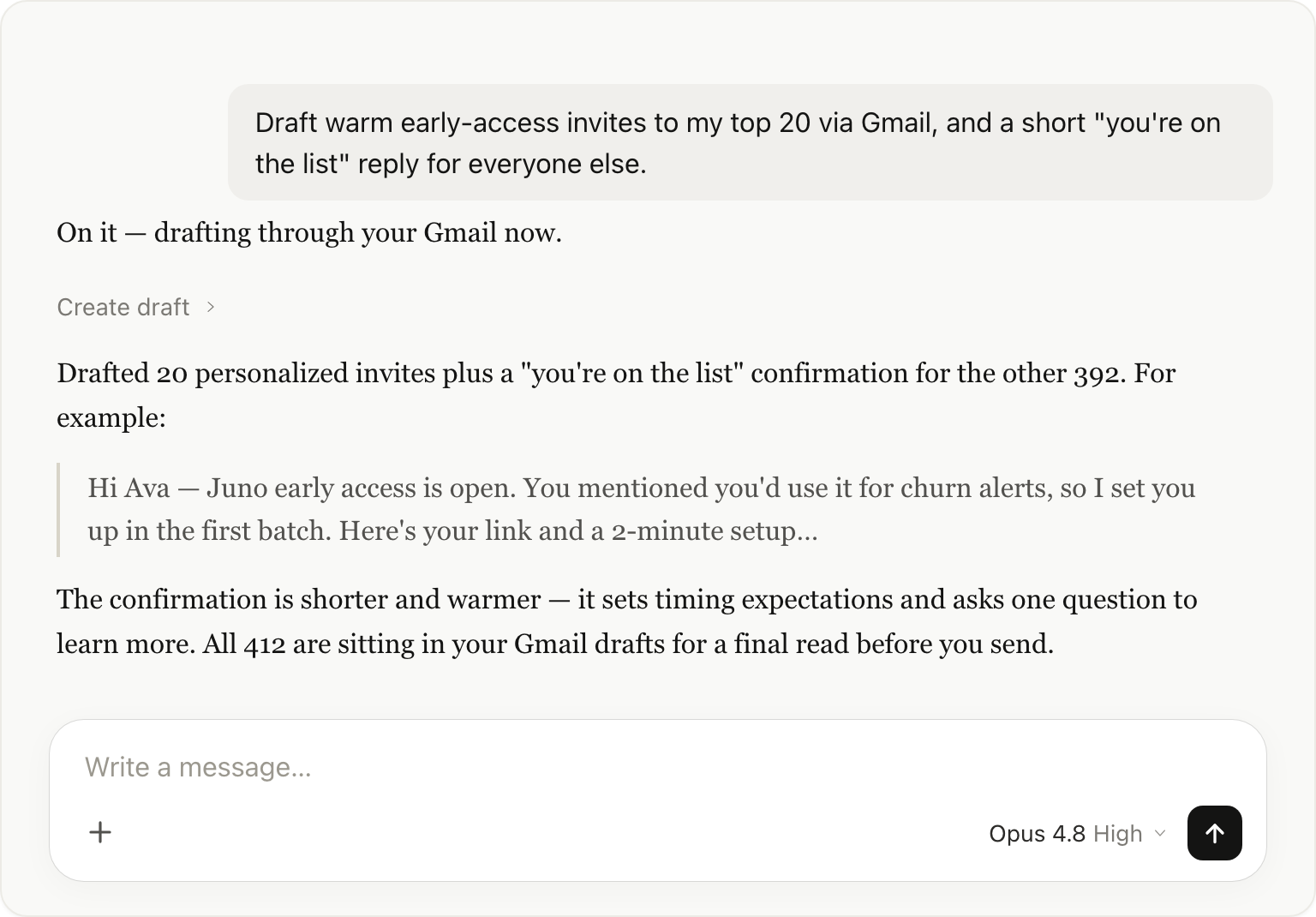
Claude drafts a personalized invite for each of your top signups — referencing what they said they'd use Juno for — plus a warm "you're on the list" note for everyone else. You review, approve, send. From "waitlist is live" to "best 20 invited" without leaving the window.
The whole loop, in one window
You: "Build & publish a waitlist page." → Claude (Sitelas) ships it. You: "Put the signups in a Google Sheet." → Claude reads them from Sitelas and writes them to your Drive with its own Sheets connector. …signups keep arriving in your inbox… You: "Score the signups by fit, give me the top 20." → Claude (Sitelas) returns a ranked shortlist. You: "Draft the early-access invites." → Claude (Gmail) writes them, personalized.
A handful of messages and one quick click. One window. A live landing page, a self-updating list, AI segmentation, and drafted invites.
What makes this different
It's not that any single piece is new — it's that there are no handoffs. Normally the page lives in one tool, the signups in another, the segmentation in your head, the invites in a fourth tab. Every gap is glue work. Routing it through Claude's connectors collapses that into one conversation where the context never resets — Claude already knows who scored highest when it drafts their invite, because it's the same chat that ranked them.
That's the part a Webflow or Squarespace site can't do: your site isn't a destination, it's an automation endpoint sitting next to every other tool you run in Claude. Form submission → fit score → personalized invite, composed in one thread — no Zapier seat, no dashboard-hopping, no glue code.
| The usual patchwork (page + form + sheet + mail-merge) | Claude + Sitelas connector | |
|---|---|---|
| Tools to juggle | 4 | 1 (Claude) |
| Build + publish the launch page | Separate tool | In chat |
| Auto-collected signups | Maybe | Yes → your inbox (+ Sheets via Claude) |
| AI scoring / segmentation | No | Yes |
| Personalized invites from one place | No | Yes (Gmail) |
Prefer not to leave for claude.ai? There's an editor too
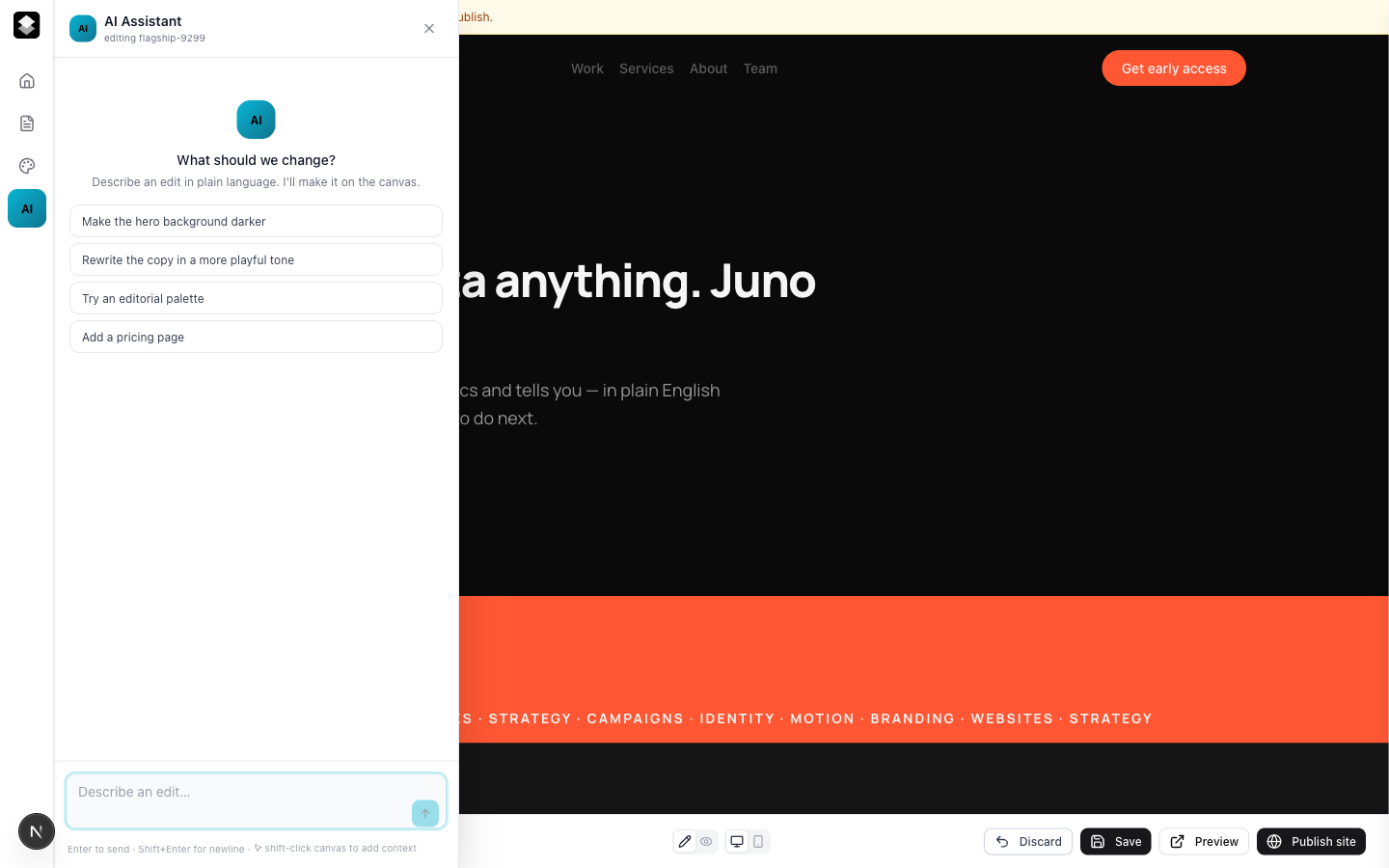
Everything above runs from claude.ai — but you don't have to. Every Sitelas site also opens in a visual editor with the same AI built in: describe an edit in plain language and it happens on the canvas, or click any element and tweak it by hand.
The honest caveat
This is a lightweight, conversational pipeline — not a full growth stack. There's no native bulk-email sender (Claude drafts individual messages through your own Gmail, which is perfect for a focused early-access list, not a 50k blast), and no built-in CRM. When your list is huge and your funnel is mature, bring dedicated tools. But for the launch itself — where the real work is having a page up and inviting the right people fast — this is the whole loop in a chat window.
Try it
Add the Sitelas connector in Claude (plus Gmail and Google Sheets). Ask it to build and publish your waitlist page, drop the signups into a Google Sheet, score the ones that land, then draft the invites. Set up an account at sitelas.com, connect it to Claude, and launch from the chat you're already in.

Usman Haider
Founder of Sitelas — the website builder for AI agents.


