How to Claim Your Business in ChatGPT (and the Website It Needs First)
Businesses in ChatGPT launched in beta on November 10. How to claim your business in Business Hub, step by step, what the insights show, and why your website comes first.

Usman Haider
ChatGPT already answers questions about your business, whether you have set anything up or not. Since November 10, you can claim your business in ChatGPT and manage the details it shows about you. OpenAI calls it Businesses in ChatGPT, and it is in beta. Eligibility depends on your industry, your location and OpenAI's checks. And there is one catch in OpenAI's own FAQ: claiming "is initially available to eligible businesses with a website."
This guide covers the claim, step by step, and the website you need first. We claimed Sitelas the day after it launched, so the screenshots are real.
What claiming your business in ChatGPT gets you
You manage everything from a new page called Business Hub. After you claim a business, you can:
- Update its details: website, description, category, logo, delivery and return policies.
- Add a product feed with prices and stock, if you sell products.
- See insights for the past 28 days: how often ChatGPT mentions you, how many people click through to your website, and the topics where you appear.
- Get a blue check. It appears once your identity check is approved.
- Build a Business Agent: a chat about your offer, set up from the guidelines and business details you give it. For now this is only for eligible US ecommerce and online service businesses.
You don't need an Ads account to claim. Ads are a separate, paid product; how to advertise on ChatGPT covers them, from our own first campaign.
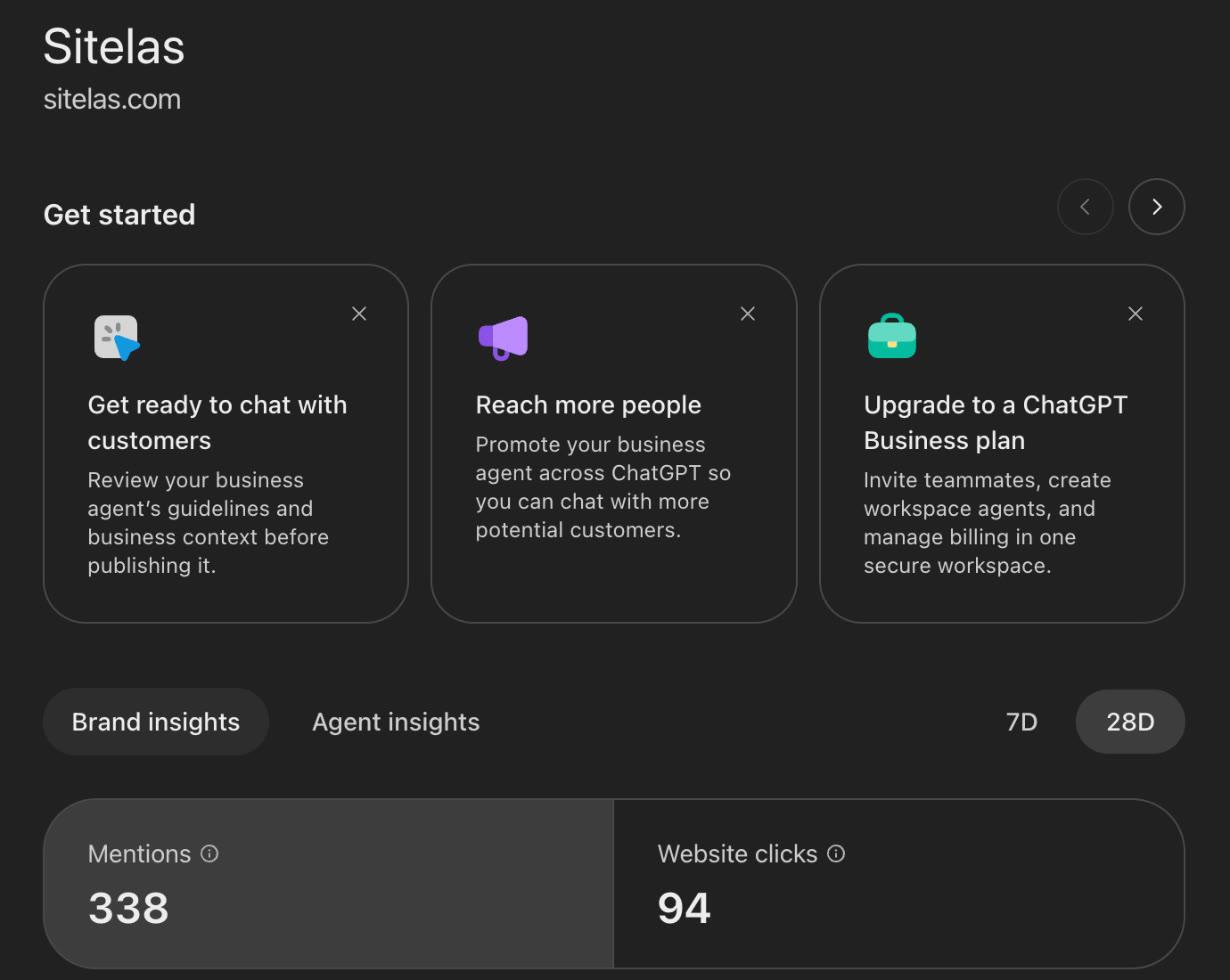
Our own profile in Business Hub, November 12, 2026: 338 mentions and 94 website clicks in 28 days.
Why the website comes first
OpenAI counts a mention of an online business only when ChatGPT references its website. Your brand name alone doesn't count. The discovery topics are themes in answers that mentioned or cited your business. For a local business, a mention counts when ChatGPT shows a result for that location. Either way, what your pages say is likely to shape what you are cited for.
Ours fits that. Our top topic is website content and marketing strategy, which is also what our blog covers.
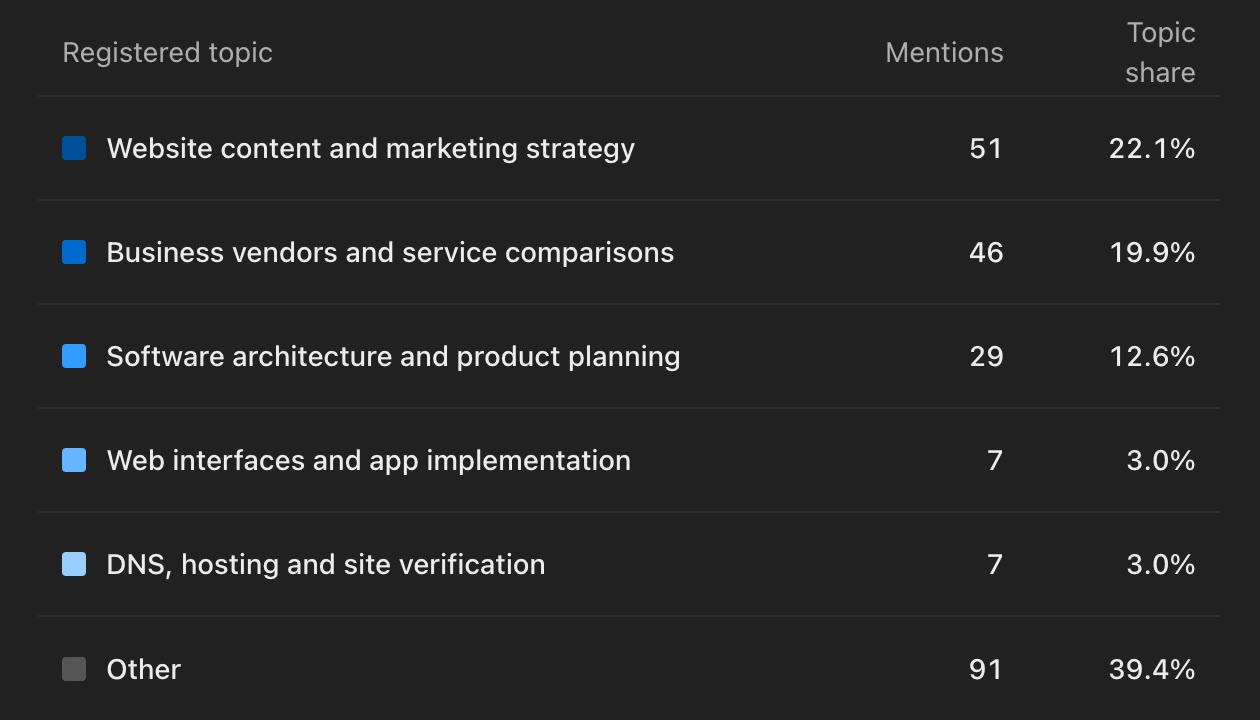
Discovery topics group the answers that mentioned or cited our business.
Before you claim, make sure your website says these things in plain words:
- What you do, in the words a customer would use.
- Where you work: your town, or the areas you travel to.
- What it costs, even as a "from" price.
- How to book or buy: a phone number, a form, or a checkout link.
- Your policies: returns, cancellations, delivery.
How to claim your business in ChatGPT, step by step
These steps follow OpenAI's help article (November 13, 2026).
- Open Business Hub. Sign in to ChatGPT and open it from the sidebar, or go to chatgpt.com/business-hub.
- Search for your business by name. Pick the listing that matches and confirm the account that will manage it. Online businesses may see an option to add a new one. Local stores and restaurants can only claim an existing US listing for now.
- Verify your link to the business. OpenAI offers methods such as these, depending on your business:
- a code to your business phone, by text or call;
- a code to your business email;
- a TXT record added to your domain's settings;
- connecting your Shopify store.
- Wait for approval. OpenAI reviews the claim and emails you its decision.
- Finish the identity check with Persona. You may need a government ID, business registration details and proof you can act for the business. Until it is approved, you can't publish changes, see insights or create a business agent.
- Update your details. OpenAI reviews each change before it shows, so updates can take time.
We used the domain record and our phone, then the Persona check. Our insights appeared within two days.
One check before step 3: the domain method needs a domain you control. A site at a free address, like yourname.sitelas.com, can't hold your TXT record. Use another method offered to you, such as your phone.
No website yet? Build one from the same ChatGPT chat
If you don't have a site, ChatGPT can build one with the Sitelas plugin. We tried it for a made-up mobile bike mechanic in Portland. One message gave the services, prices, area and phone number.
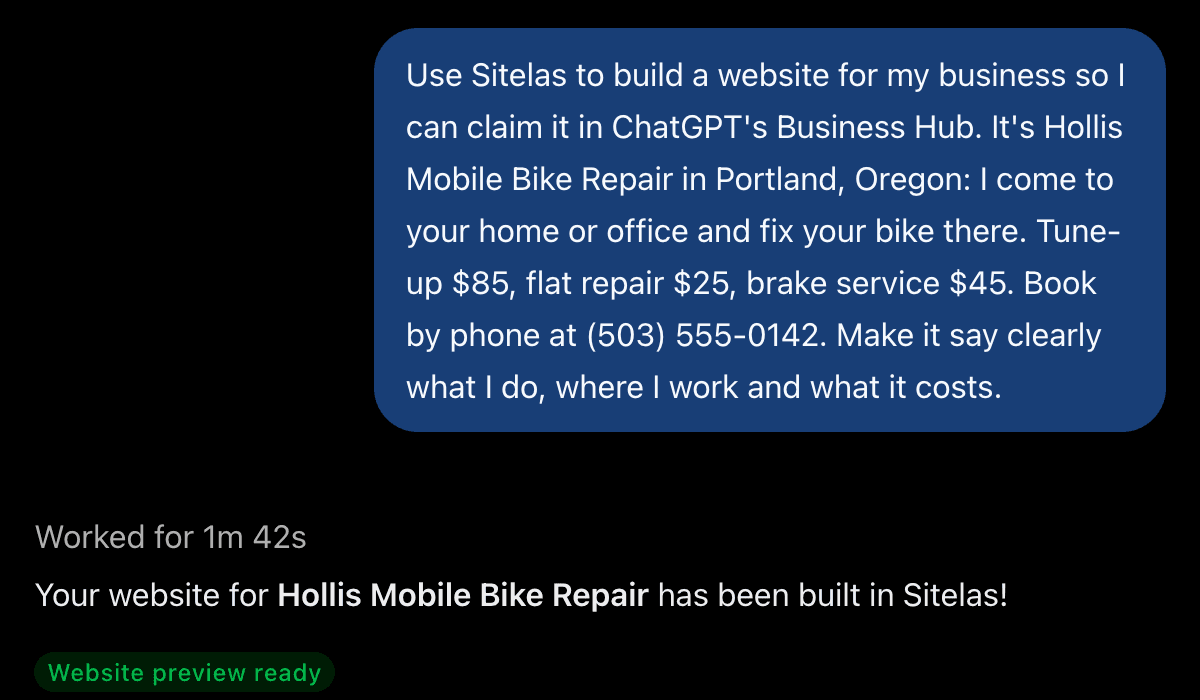
The request, and ChatGPT's answer after 1 minute 42 seconds.
ChatGPT built a home page, a prices page and a contact page. It kept the site on a preview link and asked before making it public.
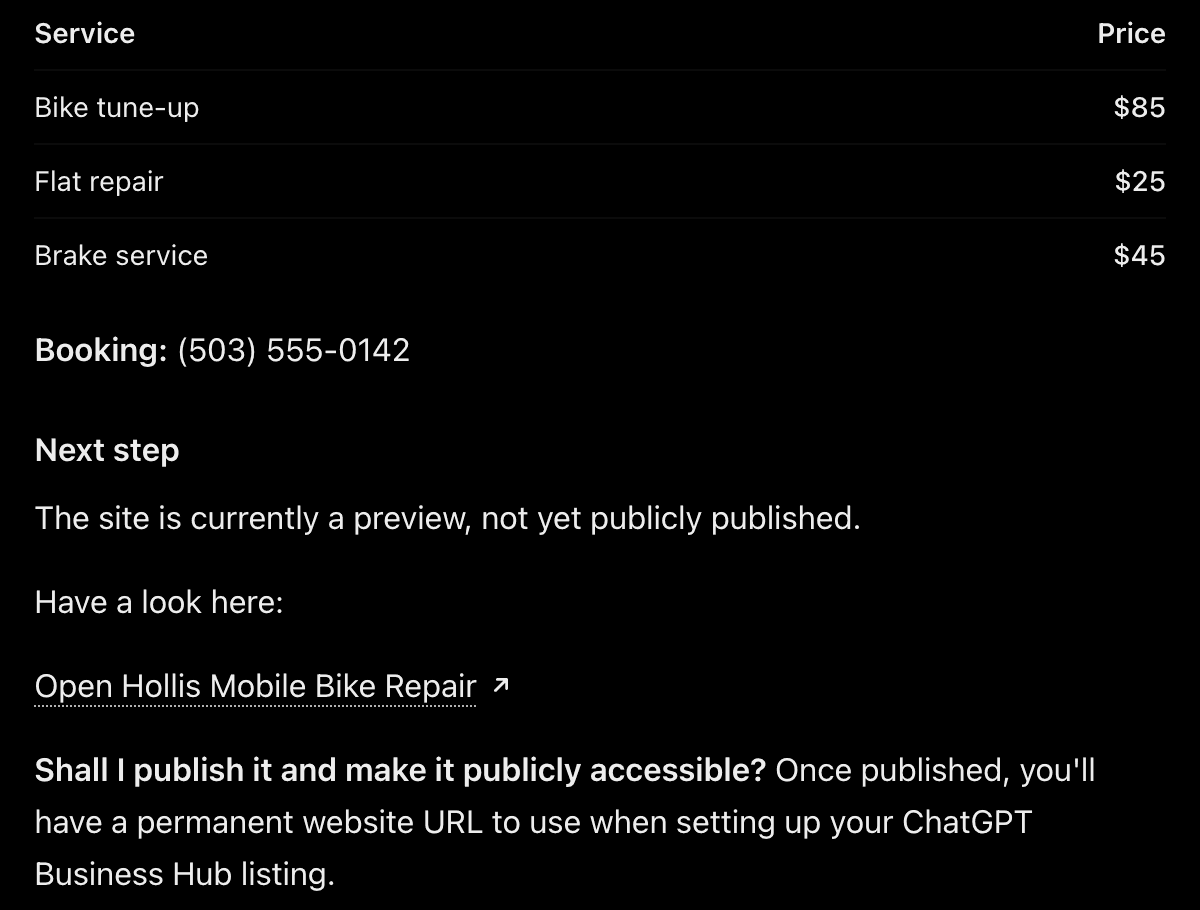
Nothing goes live until you say yes.
It wasn't flawless. The "Call to book" button came out with a camera icon left over from the template. The first fix added a phone icon but kept the camera. The second request removed it from all three pages.
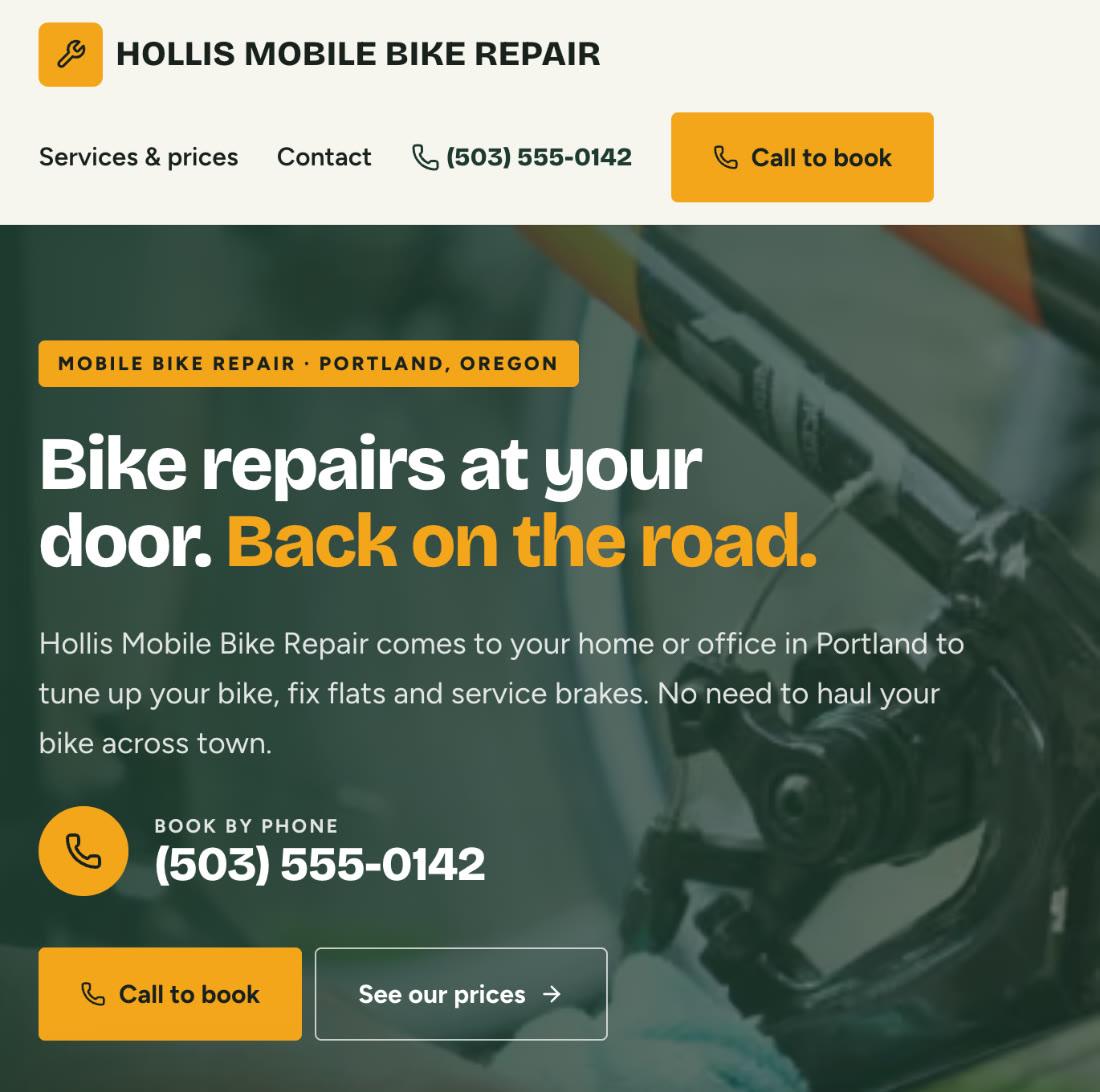
The finished preview: what the business does, where, and how to book, in the first screen.
Publish before you claim. A Sitelas preview tells search engines and crawlers to stay out, so give Business Hub the live address.
One honest limit for local businesses: OpenAI says local stores and restaurants can currently claim only an existing US listing. If ChatGPT has no listing for you yet, a website won't create one on the spot. Once published, it is still a page ChatGPT and Google can read about you.
One site is free and keeps a small "Made with Sitelas" badge. The TXT method needs a domain you own. Connecting one takes Pro: $9 a month or $90 a year per site.
What claiming won't do
- It won't guarantee a higher spot. OpenAI says claiming "does not guarantee higher placement or sales." ChatGPT still makes its own recommendations.
- It won't show you questions. You see counts and topics, not what people typed.
- A blank number isn't necessarily zero. OpenAI says a blank metric can mean the data hasn't reached its reporting threshold yet.
- The agent can't take bookings or payments. It explains your products and policies, then links to your website.
Questions people ask
Is claiming your business in ChatGPT free? OpenAI lists no fee, and you don't need an Ads account or an Enterprise agreement. You start from a regular ChatGPT account, then verify the business and your identity.
Do I need a website to claim my business in ChatGPT? OpenAI says claiming is "initially available to eligible businesses with a website." Your website is also what mentions are counted against, for an online business.
Is this the same as ChatGPT Business? No. ChatGPT Business is OpenAI's paid plan for teams. Business Hub even shows an upgrade card for it, but you don't need it to claim.
How long does verification take? OpenAI says review time varies. Ours took under two days, with the domain record, our phone and Persona.
Will claiming make ChatGPT recommend my business more? No promise. OpenAI says claiming doesn't guarantee more visibility. A clear, current website is the part you control.
Start with the website
Want to see how ChatGPT builds a site end to end? Read how to build a website with ChatGPT. If you are weighing OpenAI's own builder, see Sitelas vs ChatGPT Sites. If you run a trade, the same profile logic applies on Google: Google Business Profile for contractors. Before you publish, run through the checks before you publish.
Copy this into ChatGPT or Claude to start:
Use Sitelas to build a website for my business so I can claim it in ChatGPT. It's [name] in [town]. We [what you do]. Prices: [your prices]. Book by [phone or form]. Make it say clearly what we do, where we work and what it costs.
Add Sitelas to ChatGPT · Add Sitelas to Claude
The demo started from the Mainstay template, made for local services that take bookings by phone. Or browse all the Sitelas templates.
Templates to start from
Build this with a ready-made design, then change anything.


Usman Haider
Founder of Sitelas — the website builder for AI agents.