ChatGPT Advertising: How to Advertise on ChatGPT (and What Our First Campaign Taught Us)
How ChatGPT ads work, who sees them, what they cost and how to set one up in Ads Manager, from setting up our own first campaign: the country limit, the policy rules and the mistakes.

Usman Haider
ChatGPT advertising is new. Of the three top guides I read on Google, two were written from help pages. This one is written from a real account. This week I set up the first campaign for Sitelas, the website builder I run, in OpenAI's Ads Manager. Along the way I hit a country limit and rewrote our ad images. I also cut a section from our own landing page.
This guide covers who sees the ads, who can buy them and what they cost. Then it walks through the setup and the policy rules that caught us. The links go to OpenAI's own pages, because the rules change often.
ChatGPT advertising: what the ads are and who sees them
A ChatGPT ad is a sponsored card that appears below ChatGPT's answer, marked "Ad". OpenAI started testing them in the United States on February 9, 2026. You see one ad unit at a time. It can hold one image or several.
Each ad has your brand name, your logo, a title, a short description, an image and a link. Here is one of ours, as Ads Manager previews it:
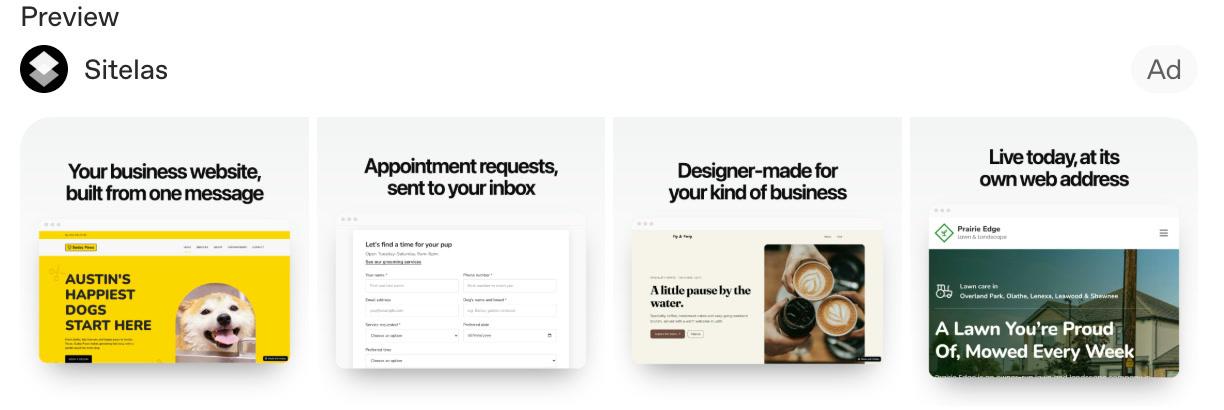
Our ad in Ads Manager's preview, November 2026. Four square images, the brand name and logo, and an "Ad" label.
Who sees them:
- Free and Go users, and people not logged in. Plus, Pro, Business, Enterprise and Edu accounts don't get ads.
- Adults only. OpenAI doesn't show ads to accounts it identifies as under 18.
- Not near sensitive topics. No ads next to chats about personal health, mental health or politics, and none in Temporary Chats.
Two things matter for your expectations. According to OpenAI, ads don't change what ChatGPT answers; they run on separate systems. And advertisers don't see chats. You get totals, such as views and clicks, and nothing about the conversation.
Who can advertise on ChatGPT
You can create an account at ads.openai.com. Running ads is narrower.
Your country has to be on OpenAI's list. Self-serve Ads Manager is open in 89 countries as of November 2026. They include the US, UK, Canada and India. The business that pays must be based in one of them.
A new account may only advertise in its home country. This is the one that caught us. Our first account wasn't a US one. Its country is on the list, so the account was created without trouble. But it could not target the United States, where the people we want to reach are. OpenAI's help page says some new accounts start limited to their home country. Wider access can come later, with local ad spend, and support won't say how much that takes.
Country, currency and time zone are permanent. You pick them when you create the account, and they can't be changed later. So we opened a second account for our US company, billed in dollars, to target the US. Choose these three with care.
The account also has three names. The Account name is internal. The Brand name shows on your ads. The Legal name is used for billing and business verification. Changing the brand name pauses your ads until it is reviewed again.
How much ChatGPT ads cost
You choose what you pay for when you create a campaign:
| Objective | You pay for | Good for |
|---|---|---|
| Views | Every 1,000 impressions (CPM) | Being seen |
| Clicks | Each valid click (CPC) | Sending people to a page |
| Conversions | Clicks or impressions, not sales | Sign-ups or sales tracked |
The lowest daily budget in the US is $25. Other currencies have their own minimum. For click campaigns, OpenAI suggests starting at a bid of $3 to $5 per click. That is a starting point, not a price list.
Two budget rules surprised me:
- A daily budget is an average over the week. The budget week runs Sunday to Saturday. One day can spend up to twice the daily figure. The week won't go over seven times it.
- A total budget is spread over the dates you set. With no end date, Ads Manager paces it over 60 days. Set an end date if you want it spent sooner.
Our first campaign had a $100 total budget over four days. Ads Manager showed it as about $25 a day:
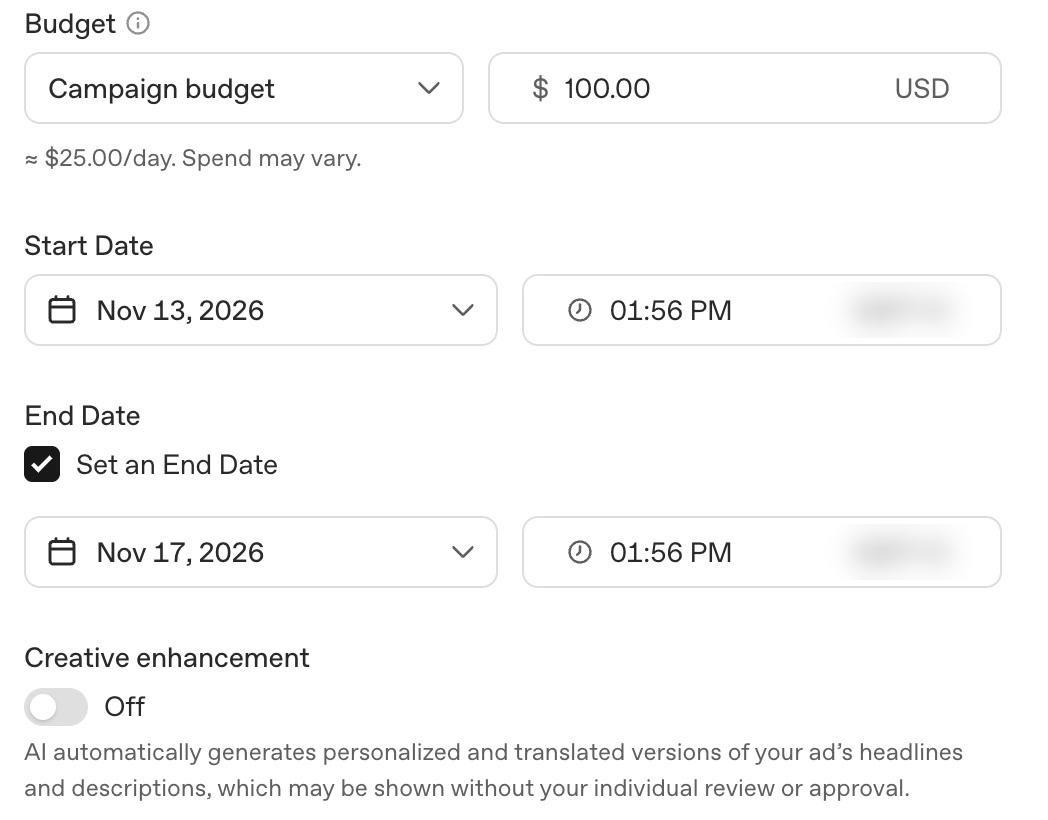
Our campaign's budget and dates, November 2026. Ads Manager suggested a longer run; four days was a first test.
Bidding is changing too. Since November 9, new click campaigns can use Target CPC. It is an average you aim for, not a fixed maximum bid. OpenAI is retiring the old maximum-bid setting on January 1, 2027. We left our ad group on Autobid. Ads Manager describes it as adjusting your bid "to get the most results from your budget".
How to advertise on ChatGPT, step by step
This is the order Ads Manager walks you through.
1. Create an Ads Manager account
Go to ads.openai.com and sign in with your OpenAI login. You can paste your website address and let Ads Manager draft your first ad. You can also skip that step.
Before you submit, check the country, currency and time zone. Then add a card under Billing. Ads can't run until billing is set up. Ads Manager also asked us to verify the business, which we did the same day.
2. Create a campaign
A campaign holds the objective, budget, dates and countries. Click Create, then Create campaign. To target only the US, add the United States as a location. Excluding other countries is not enough.
Further down you'll find Creative enhancement. Ads Manager says it uses AI to write "personalized and translated versions" of your ad text. Those versions "may be shown without your individual review or approval". We switched it off, because each line in our ads is a claim we have checked.
3. Create an ad group, with context hints
An ad group holds your bid strategy and your context hints. ChatGPT has no keywords. Hints are plain sentences about when your product helps. The system uses them as one signal among several.
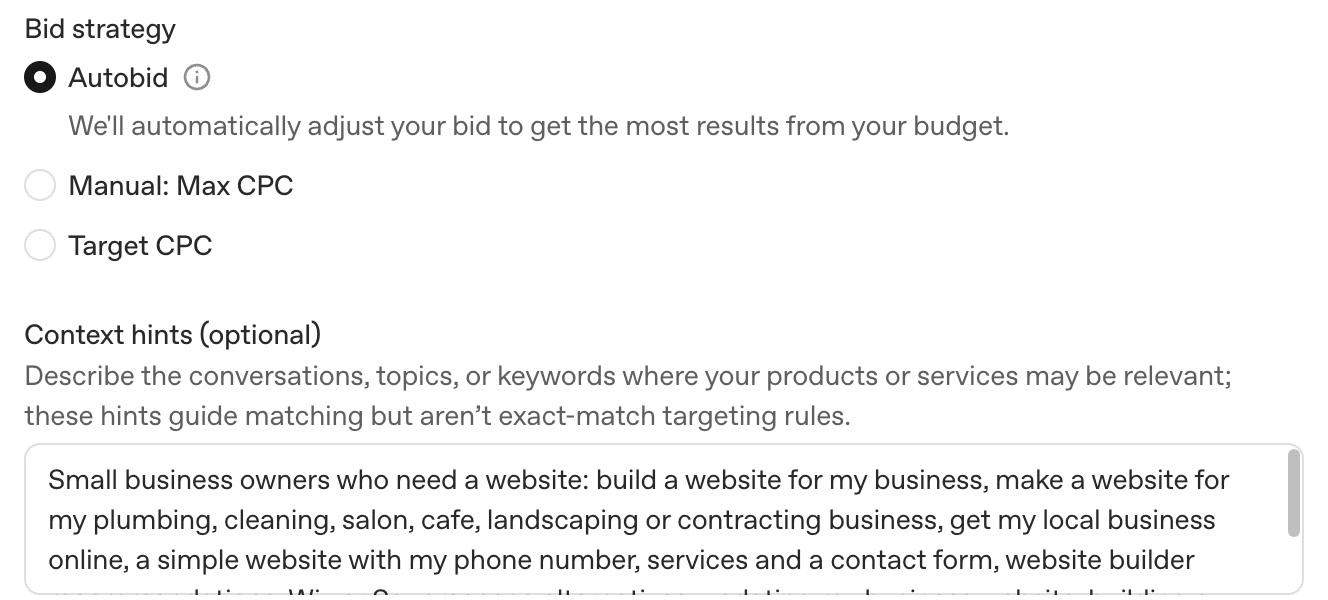
Our ad group, November 2026. The hints are a long list of phrases. OpenAI's own guide says not to do this.
Ours is the example of what not to do. I wrote a comma-separated list of searches, the way you would for Google. OpenAI's guide asks for one idea per hint, in a natural sentence. Say what you offer, who it is for, or when it helps. Its own example for a plumber is "After-hours residential plumbing in [city], with an $89 service-call fee for urgent repairs."
Hints also aren't rules. "Show this only to people in Chicago" does nothing. Use the campaign's location setting for that.
4. Create the ads
Each ad needs a title, a description, a link and one or more images. OpenAI advises linking to the most relevant page, not a generic homepage. No page yet? Here is how to build a website with ChatGPT. You can choose a single image or multiple images. A multiple-image ad takes 4 to 6 square images, all linking to the same page. With multiple images, the only button is Learn more.
The editor counts characters as you type:
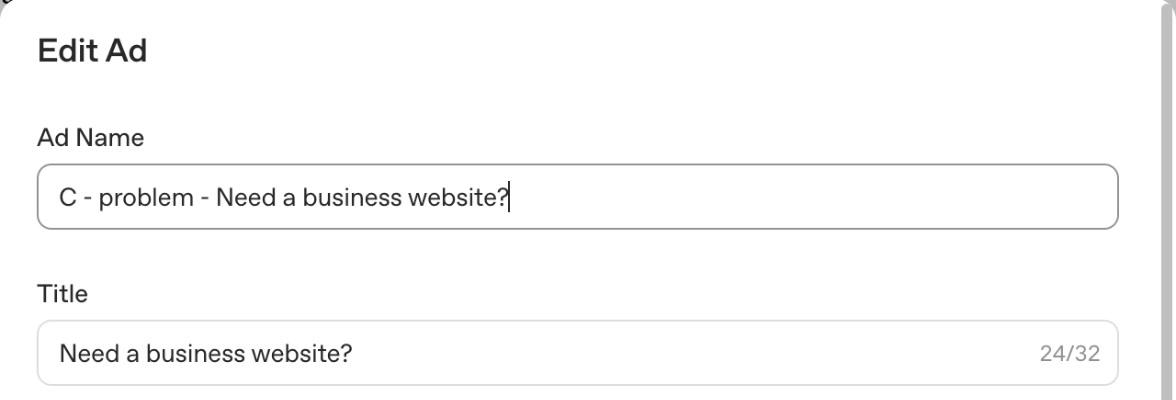
The title field in Ads Manager allowed 32 characters on our ad, November 2026.
Keep titles short. Ads Manager warned us that titles over about 26 characters may be cut off on screen. OpenAI's bulk-upload guide recommends 16–24 characters for a title and 32–48 for the description. One of ours is 24 and 52, so its description runs over that advice.
We wrote three ads with the same four images. Each takes a different angle: the promise, the speed, the problem. OpenAI's own advice is to give the system several distinct versions rather than one.
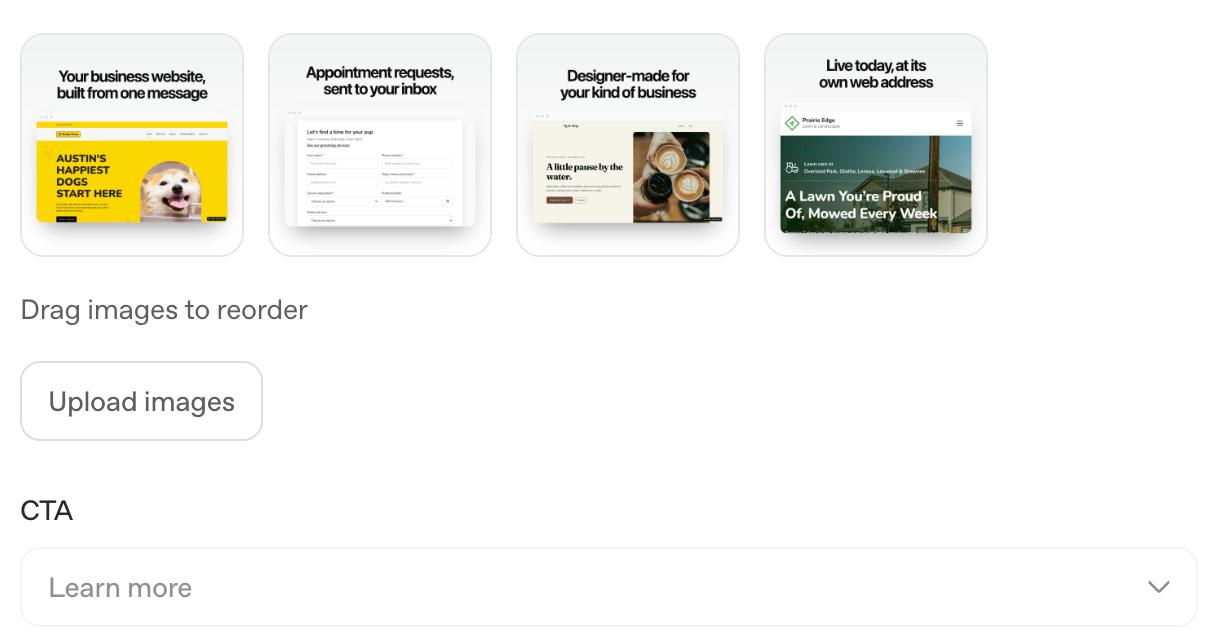
Our four square images, November 2026. Each shows a website built with our product; none shows ChatGPT itself.
5. Add tracking, then submit for review
Ads Manager adds tracking parameters to your link when someone clicks. It fills in placeholders such as {campaign_id} and {ad_id}. We used:
utm_source=chatgpt-ads&utm_medium=cpc&utm_campaign={campaign_id}&utm_content={ad_id}
That last part tells our analytics which of the three ads brought each visitor. We count sign-ups in our own analytics. The Conversions objective needs OpenAI's Pixel or Conversions API installed instead, and we haven't set that up yet.
Then publish and check each on-off switch. After we published, our ad group and ads were switched off, and we had to turn them on. Each ad shows Submitted, then In review, then approved or rejected. Two of our three ads were approved the same day. The third had "ChatGPT" in its title and was still in review when I wrote this.
After launch, clicks and impressions update about every 15 minutes. Spend can lag 7 to 8 hours. A spend of zero early on doesn't mean nothing was charged.
The ad policy, in plain words
OpenAI's ad policies are at version 1.6, dated September 2026. For now, only a few kinds of business can advertise. They include consumer goods, local services, travel, digital products and education. Others need approval case by case or are not allowed yet.
Three rules changed our ads before they ever ran:
- Don't look like ChatGPT. Ads "must be clearly distinguishable" from ChatGPT. Our first images were screenshots of a ChatGPT conversation. They showed our product exactly as it works, and they were still the wrong choice for an ad. We replaced them with screenshots of finished websites.
- Only use logos you own. The policy allows only trademarks and logos you own or are allowed to use. Our first images carried OpenAI's logo, so that was a second reason to swap them.
- OpenAI can say no for business reasons. Version 1.6 added that OpenAI may decline ads that conflict with its "business interests, or competitive position". Our landing page compared our product with an OpenAI product. We took that comparison off the page while the ads run.
Review covers the whole ad: title, description, images and the landing page, so check the page before you publish. Automated systems review ads, with human oversight. Your page also has to let OpenAI's crawlers in. Check that your site doesn't block OAI-AdsBot or OAI-SearchBot.
ChatGPT ads vs Google Ads
The honest answer for now: it's too early to know, and the first numbers are not encouraging.
One independent study compares the two. It is a working paper by Maximilian Kaiser and Christian Schulze. Version 1 is dated October 2026 and is not yet peer reviewed. In US shopping traffic, a paid ChatGPT visit brought in $0.89 on average. A paid Google Search visit brought in $2.45. Paid ChatGPT visitors bought 0.37% of the time; paid Google visitors, 1.17%.
Read that with its caveats. The data covers online shops, not local services. Most paid ChatGPT revenue in it comes from one advertiser, though leaving it out makes the gap bigger. And it only counts purchases made in the same visit.
The bigger difference is how each one matches. Google Ads matches mainly on the search someone typed. ChatGPT matches the conversation, using your hints, your ad and your landing page. You give up control over exactly where your ad appears. In return, it can show next to questions you didn't think to bid on. Showing up in ChatGPT's answers is a separate job from ads. It starts with claiming your business in ChatGPT.
What we would do differently
- Open the account in the country you want to advertise in, under a business based there. It can't be changed later.
- Write context hints as sentences, one idea each. Ours will be rewritten before the next campaign.
- Read the ad policy before making images. It's shorter than a day of rework.
- Track each ad separately from day one. Put
{ad_id}in your tracking parameters. - Plan for review time. Our ad with "ChatGPT" in the title took longer than the other two.
Our campaign is paused while I write this, so there are no results yet. When it has run, I'll add what it cost and what it brought in. That includes the parts that didn't work.
Our ads point to one page, about building and running a website from a ChatGPT chat with Sitelas. If your own ad needs a landing page, that page shows how in about a minute.
Questions people ask
How much does it cost to advertise on ChatGPT?
You set your own budget. The lowest daily budget in the US is $25, and other currencies have their own minimum. For click campaigns, OpenAI suggests starting with a bid of $3 to $5 per click. You pay what the auction sets.
Does ChatGPT have ads?
Yes, for some users. Ads appear below answers for people on the Free and Go plans, and for people not logged in. That's in countries where ads are being tested. Plus, Pro, Business, Enterprise and Edu accounts don't see them, and neither do accounts identified as under 18.
How do ads in ChatGPT work?
You create a campaign, ad groups and ads in Ads Manager at ads.openai.com. ChatGPT picks which ad to show from the conversation and your ad. It also weighs your landing page, context hints and bid. There are no keywords.
Can I advertise on ChatGPT for free?
Not really. You pay for the ads you run, with a $25 daily minimum in the US. Credits can lower the bill: OpenAI has a help page on claiming ad credits with ChatGPT Business. Our first account was offered a match: spend a set amount within two weeks and get the same back as credit.
Can I advertise on ChatGPT from outside the US?
Yes, if your country is on OpenAI's availability list; 89 countries were as of November 2026. A new account may only be able to target its own country at first. Pick your account's country with that in mind, because it can't be changed.
Are ChatGPT ads worth it?
It's too early to say. The one independent study so far looked at online shops. A paid ChatGPT visit earned about a third of a paid Google Search visit. Test with a small budget and track each ad separately. Then compare the cost per customer with your other channels.

Usman Haider
Founder of Sitelas — the website builder for AI agents.