

Selvedge Interior design website template
Selvedge is for an interior designer or a small studio that designs whole homes and single rooms. Your projects fill the top of the home page as a scattered grid of photographs, each with its own page of pictures, rooms and scope; the Services page sets out your fees in plain numbers; and every page leads to an enquiry form that asks what kind of project, the budget and the timing.
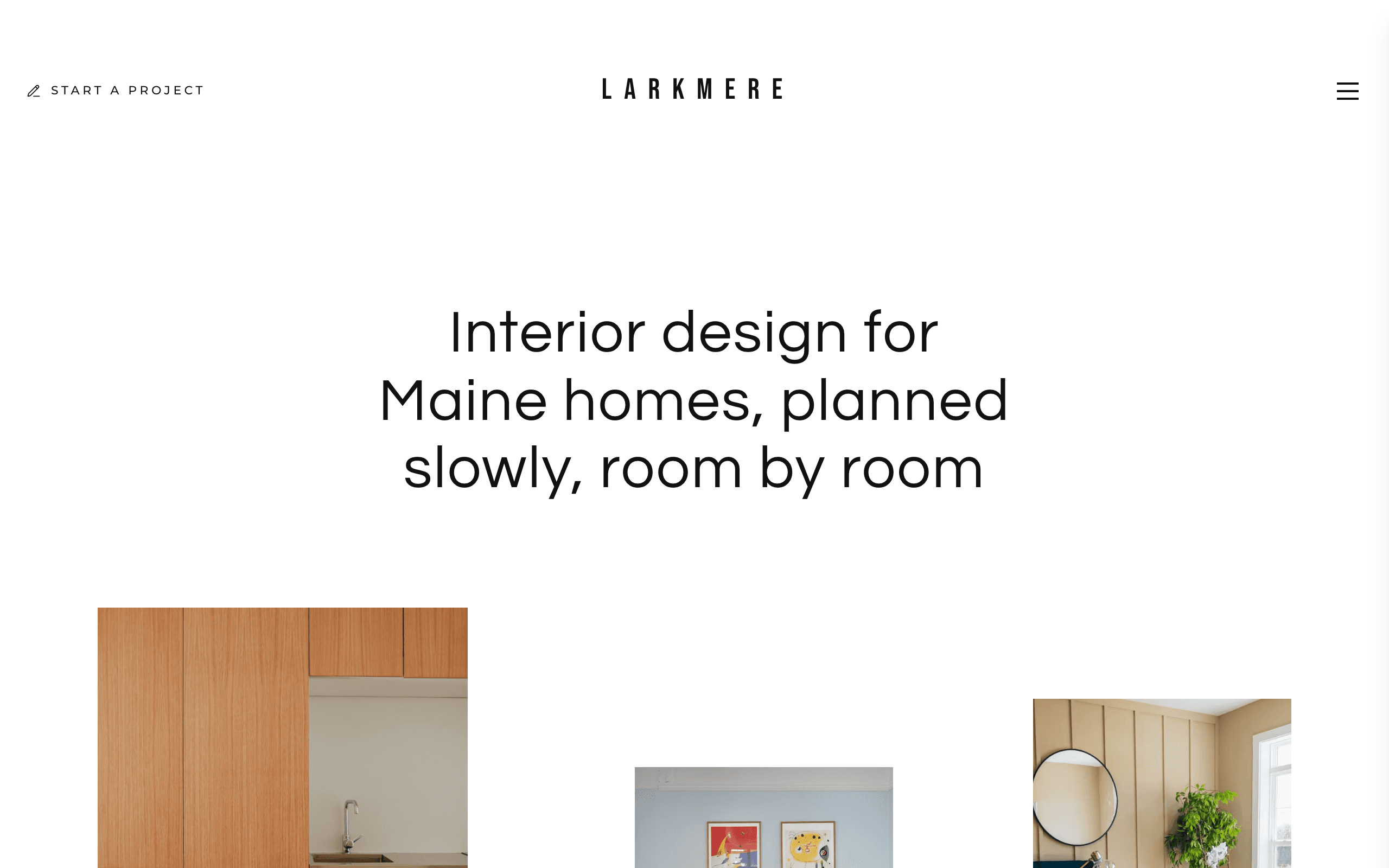
Who Selvedge is for
- Residential interior designer with a small studio
- Interior designer working alone on whole homes and single rooms
- Interior decorator showing finished rooms and fees
- Kitchen and bathroom designer who also furnishes the rest of the house
- E-design service planning rooms online
- Home stager showing finished rooms to agents and sellers
- Interior design studio publishing notes on colour and materials
What’s included
- Pages
- 6 pages, written and laid out
- Grows with you
- 6 project entries at /projects/, 6 article entries at /journal/ — add one and its index and detail page both update
- Enquiries
- A working form — messages land in your Sitelas inbox
- Fonts
- Questrial and Roboto · light theme
Build Selvedge by asking your AI agent
- 1Connect Sitelas to Claude, ChatGPT or another AI agent that supports MCP. How to connect
- 2Ask for it in plain words: “Build my interior design website with the Selvedge template: I'm a residential interior designer in Charleston doing whole homes and e-design, with six finished projects, my fees from $3,500 a room and a project enquiry form.”
- 3Open the preview link it sends back, ask for changes, and publish when it reads right.
Then keep changing it from the same chat
- Rewrite the copy“Rewrite the ‘Projects’ page with my details, in a warmer voice.”
- Change the design“Keep the layout, but swap Questrial for another typeface and use my brand colours.”
- Add project entries“Add three project entries from these notes, each with its own page.”
- Swap the photos“Replace the photos on the ‘Services’ page with my own.”
Everything here can also be done by hand in the visual editor.
About the Selvedge template
Built for residential interior designers
Selvedge suits a small residential interior design studio or a designer working alone: whole homes, single rooms, kitchens, bathrooms and e-design. It is written for homeowners deciding whether to hire a designer, and every page leads to a project enquiry.
What's on the site
- Home: your projects in a scattered grid, the studio, the kinds of home you design, how a project runs, the questions clients ask and your journal
- Projects: every project, each with its own page of photographs, rooms, scope and year
- Services: four ways to work with you, with fees, and the questions people ask before booking
- About: the studio, where a budget goes, three promises and an invitation to arrange a first consultation
- Journal: notes on colour, light, materials and fees
- Contact: a map, your studio details and a project enquiry form
What to know
Fees, figures, projects and journal notes are samples to replace. The sample project photographs are stock: replace them with your own work before you publish. Enquiries arrive in your Sitelas inbox. There are no client log-ins or payments; link to your own tools.
When to pick something else
Selvedge is the wrong template for these. Where there is a better one, it is linked.
- House painter or decorator taking quote requests by phone — try Dado
- Furniture or homewares shop with a checkout
- Architecture practice showing buildings, plans and competitions
- Photographer whose pictures are the product — try Loupe
- Maker selling commissioned furniture or ceramics pieces — try Cami
- Building contractor or remodeler selling construction — try Spanner
Free to use · No credit card required
Key Highlights
Questions about Selvedge
Can I show what I charge?
Yes. The Services page lists four ways to work with you, each with a fee, and the home page answers "what does an interior designer cost?" with your own starting fee. They ship as samples, so set your own before you publish.
Does it work if I offer e-design?
Yes. E-design is one of the four services, it has its own question on the home page and a journal note explaining it, and the enquiry form lists it as a project type. Clients send their details through the form; there is no client portal or payment, so link to the tools you use for those.
Who is Selvedge for?
Selvedge is for residential interior designers, interior decorators and small design studios who work on whole homes, single rooms, kitchens, bathrooms and e-design, and want homeowners to see finished rooms and fees before they enquire. A house painter taking quote requests fits Dado better; a photographer whose pictures are the product fits Loupe.
What pages come with Selvedge?
6 pages, already written and laid out: Home, Projects, Services, About, Journal and Contact. Add, rename or remove pages whenever you like.
Can Claude or ChatGPT build my site from Selvedge?
Yes. Connect Sitelas to your AI agent and ask for a site that uses Selvedge. It fills in your details, sends you a preview link, and publishes when you approve. The same chat can keep running the site afterwards.
Can I change Selvedge without code?
Yes. The Questrial and Roboto type, all 6 pages and the project entries, every photo and every colour can be changed in the visual editor, or by asking your AI agent.
What does it cost?
Nothing to start, with no trial clock. A free site runs on a sitelas.com address; Pro is $9 a month per site ($90 a year) for your own domain, analytics and more room.
Make Selvedge yours
All 6 pages open in the editor already written, with 6 starter project entries. Make the words and photos yours, then publish.
Free to use · No credit card required
Related templates
All portfolios & résumés templates →
Loupe
A photographer's site of packed photo walls, where every photo opens full screen, plus a contact form.

Pazari
An ultra-minimal photography portfolio with category galleries and full-width images.

Sawad
A dark portfolio for freelance developers: your photo and links beside your projects, tools and a blog.

Axel
A split-screen portfolio: a full-bleed image beside your work, blog and a contact form with budget.

Biobricks
For solo product and web designers: work, services with prices, writing, products and a tools page.

Cami
A minimalist, image-led portfolio: large project photos, a case-study page per project and an enquiry form.